Maven dependency in project module

Dear Community,
please help me to resolve my problem or to understand the mechanism of Maven dependencies in module.
I have simple Maven project (named "Common") with the only one dependency:
<dependencies>
    <dependency>
        <groupId>org.geotools</groupId>
        <artifactId>gt-main</artifactId>
        <version>19-RC1</version>
    </dependency>
</dependencies>
And one class with some imports:
import com.vividsolutions.jts.geom.Coordinate;
import com.vividsolutions.jts.geom.Geometry;
import com.vividsolutions.jts.geom.GeometryFactory;
import com.vividsolutions.jts.geom.Polygon;
It's all working good.
Now I would like to move it to the module. So I create new module in this project (named "gis"), mark source root, and simply copy-paste code from project folder to module folder. Project dependency appears both for project and module:

But all imports are marked GRAY. "Cannot find symbol...":
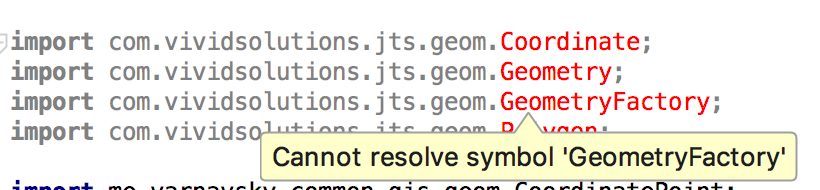
Also in project settings there are no dependencies for "gis" module:


I tried to run "mvn clean install" and it completes successfully: build project, module and put them to local repo.
Also I tried to use managed dependencies - with the same failed result.
So the question is - what am I doing wrong? Why imports work good in project, but give errors in module?
Thanks in advance,
Pavel.
Please sign in to leave a comment.
You need to resolve the issue via Maven configuration, then import the multi-module Maven project into IntelliJ IDEA.
See http://www.codetab.org/apache-maven-tutorial/maven-multi-module-project/.
IntelliJ IDEA Maven integration is one way. The changes you make in the UI are not reflected in pom.xml.
Well... It was solved by this steps:
1. Close project in IDEA
2. Remove .idea folder and all .iml files
3. Create new project from existing sources (as Maven project).
That's all and it works now. No changes have been made in Maven config or code. But you point right direction about "import the multi-module Maven project...".