IntelliJ Ultimate 2018.1 - No folders are displayed in Project on mac OS
Answered

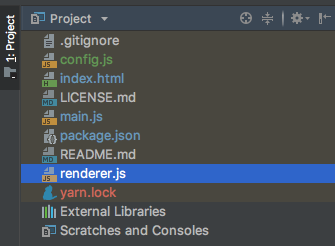
I've opened a new project I created with the Electron CLI and no folders are displayed in the Project section. If I open up a React project the folders are displayed. I can't seem to find the correct configuration to have the folders displayed. Any pointers?
Please sign in to leave a comment.
Hello,
Is it possible to share sample project for investigation?
I tried to replicate the same behaviour in another project but there the folders do get displayed.
Have you tried to run "File Synchronize"? What is the path to the initial project?
Re-created the project and copied resources into new project and it's working fine now.