Set default active or change color on tab
Answered

Hello there,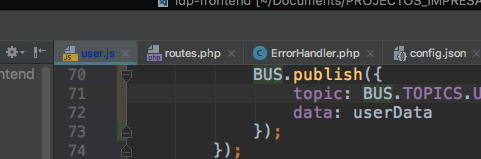
My problem its to change the dark blue active tab. i can't reset that. How i can fix this?
Many thanks,
Pedro Cruz
Please sign in to leave a comment.
Do you always have such a color for any file name in the active tab?
If you use Version Contolr it looks like the file name is colored by the Preferences | Version Control | File Status Colors (e.g. Modified in not active changelist) which you can adjust.
Does it help?
Thank @Andrey Dernov for quick answer!
But, nop, i dont specify that, it's only when i have changed my file and intellij recognizes that i have git on my project, so the file its untracked. And it happens everytime i have different files from repository basically
Many thanks
Pedro Cruz
Not sure I understood. Do you have this color for all files that become an active tab or only for some files, depending on their git status?
>And it happens everytime i have different files from repository basically
Do you mean for every changed locally file? Check then the color attributes for Modified in mentioned 'File Status Colors' list.
Yeah, it's only depending on git status, in an active tab ou inactive tab. It'e equal.
But yeah, i did it! Your solution works!
Many thanks, Keep the good work!
Pedro Cruz ;)