importing pandas prevents console output
Answered

I use Pycharm 2018.1 and anaconda python 3.6
EDIT: I checked and the behavior descibed below does not occur in Pycharm 2017.3
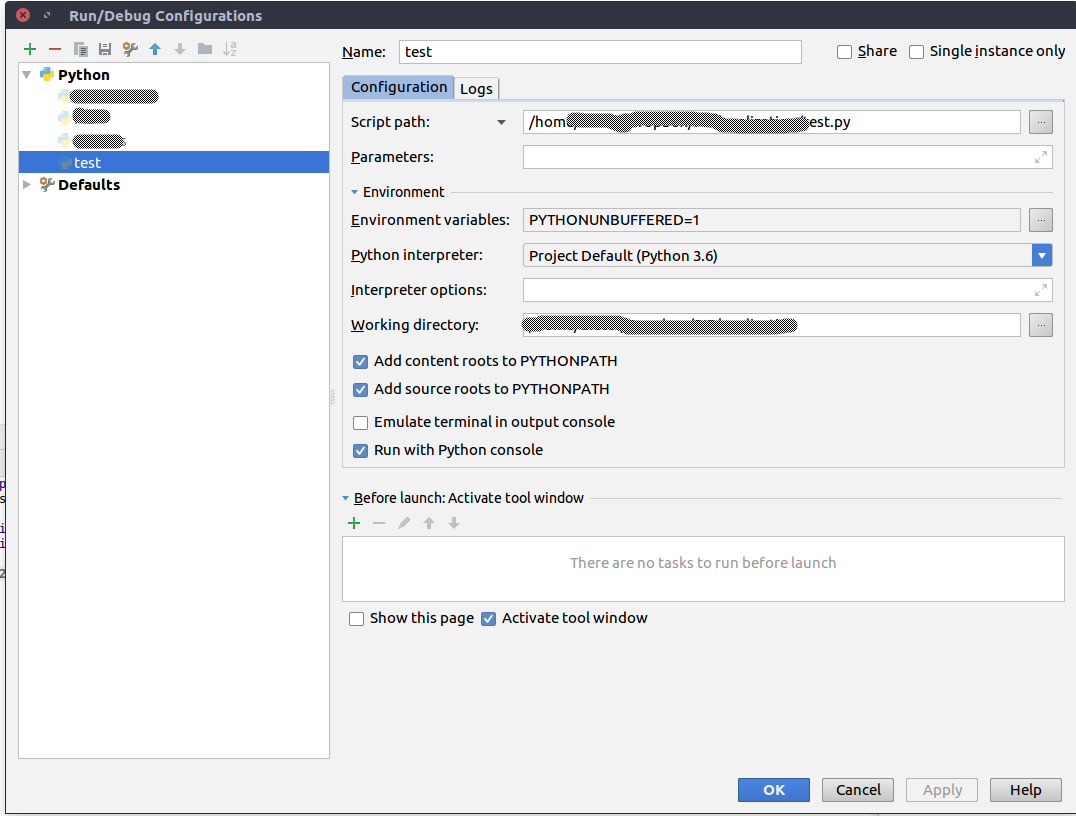
When I run a script using the configuration in the screenshot below, I get its output in the console as expected. Also, I get a command line afterwards. However, if I import Pandas in the same script, no output is generated.
For example, this very simple script:
print('test')results in 'test' being printed as output in the console window. This is the output:

Simply adding a Pandas import statement as follows
import pandas
print('test')
makes that I do not get any output. This is what's printed.Nottice, no 'test' is printed.

Why would importing pandas mess up Pycharms behavior?
This is my configuration I use to print run things:
Please sign in to leave a comment.
I just checked and this behavior is not present in pycharm 2017.3
Looks like a known issue https://youtrack.jetbrains.com/issue/PY-29186 (Python folding for "Run with Python Console" option enabled), please follow it for updates. See https://intellij-support.jetbrains.com/hc/en-us/articles/207241135-How-to-follow-YouTrack-issues-and-receive-notifications if you are not familiar with YouTrack.
Please click on the green highlighted line (as on the attached screenshot) to expand folding. Does it help?