What loop are you talking about? Does Webstorm hang? Or, the last command is repeated in terminal on hitting Ctrl+C? What shell is chosen in Settings | Tools | Terminal? please attach a screenshot of this page
So, does the issue occur if you enter `y` + `Enter` to terminate the process? Does the issue only occur when terminating Node.js processes? Does the same command work in Windows cmd console, outside of WebStorm?

What loop are you talking about? Does Webstorm hang? Or, the last command is repeated in terminal on hitting Ctrl+C? What shell is chosen in Settings | Tools | Terminal? please attach a screenshot of this page
Tks for reply @Elena Pogorelova

This my Settings Terminal.
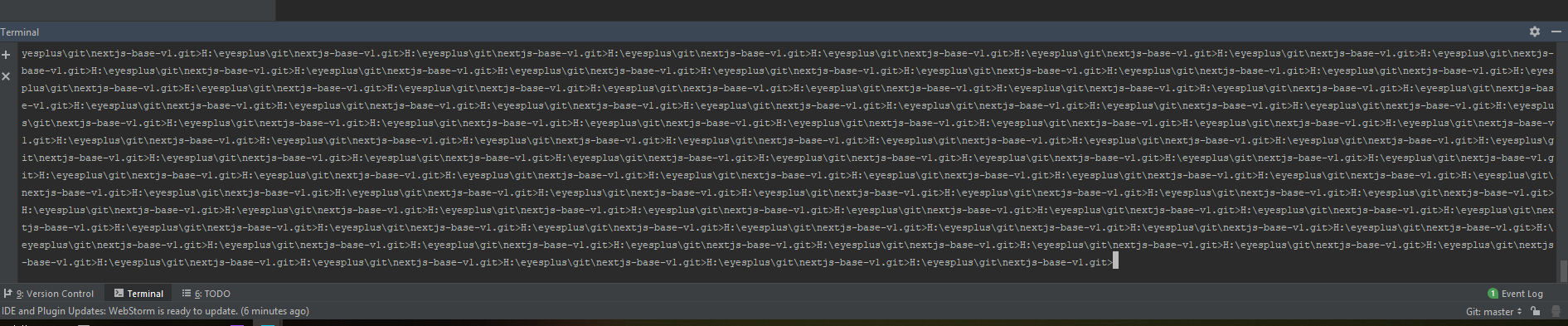
Current me run command "npm run dev" => After me press ctrl + c ( stop command ) => The input command ( webstorm ) loop is infinite loop
I installed the new version but it seems to be still
>The input command ( webstorm ) loop is infinite loop
what input command is meant? `npm run dev`? Or? Is the problem specific to the command being run?
The input command does not matter, I suffice with all the commands.
Just the terminal is running and then ctrl + c is infinite loop
My video error terminal
https://www.youtube.com/watch?v=14V2X467VRo
So, does the issue occur if you enter `y` + `Enter` to terminate the process? Does the issue only occur when terminating Node.js processes? Does the same command work in Windows cmd console, outside of WebStorm?
Please recreate the issue and provide your idea.log (https://intellij-support.jetbrains.com/hc/en-us/articles/207241085-Locating-IDE-log-files)