Window size glitches since 2018.1 update when opening projects

Hello there!
I've got a very weird problem since I updated my phpStorm to 2018.1 (or now 2018.1.1) on macOS High Sierra 10.13.4 with the window sizing when re-opening a project. Sometimes (but not always, I can't reproduce a constellation when it happens and when it doesn't happen) the project window just shows me the title bar and I have to resize it again and open the side panels again. On startup it looks like this then:
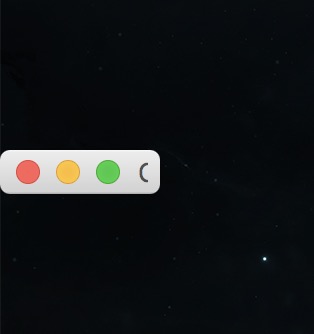
Could this be related to the bug where it also doesn't store the status of the tabs inside the project window? I read through the support forums here and that was the only close ticket I found to my problem.
I've already tried the following things to solve that problem myself without luck:
- Export Settings, delete config files & phpStorm package, re-download the full version and import settings again
- uninstalled the "Settings Sync" Plugin because I thought that could mess up the window size sync if there is any
- tried manual dragging to a new size and "maximize" button and hoped there would be a store of the size
I even get that problem with multiple projects I have so I also don't think that there is anything wrong with a specific project folder. And the most weird thing is: Sometimes the size is absolutely ok. Sometimes it isn't. I have absolutely not found any pattern what could cause that problem to happen.
Oh and I don't use any 3rd party Plugins or Themes at the moment, just the JetBrains defaults & Git(Hub) integration. Logfile looks OK, no errors there.
Maybe anybody here has a quick hint for me what I could try to fix that? :)
EDIT
I just found someone with the same problem in the issue tracker here and 4 linked issues about that. I add the link here: https://youtrack.jetbrains.com/issue/IDEA-190382 - the mentioned trick on StackOverflow with "Window" -> "Store current layout as default" also doesn't work. But I noticed that the reset seems only to happen when phpStorm was completely closed. If I open the project and just close it and reopen it that problem doesn't seem to reoccur. As soon I quit phpStorm and restart the window is small again.
Please sign in to leave a comment.
I added a link to this thread within a private comment to the issue, should be fixed soon I believe.
Cool, thank you for the feedback! :-)