About "Find in path " question
Completed

My program and find in path search results are like this :
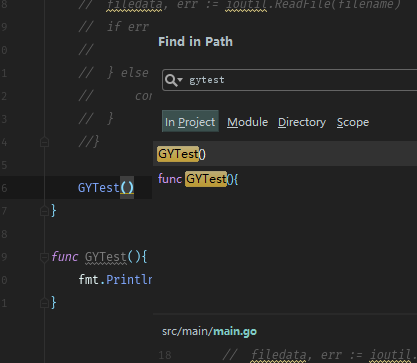
And then i press the OPEN IN FIND WINDOW button, It comes :

And also use the "Find Usages" on gytest , it shows :

Could some one tell me what did i do wrong ? Thanks a log.
Please sign in to leave a comment.
Hi,
According to the screenshot `GYTest()` call is not a usage of `GYTest` function that is defined later. Where IDE navigates you on Ctrl+Click on `GYTest()`?
Please provide entire code to recreate the issue.
There's a biger pic :
Ctrl Click GYTest located to line 14.
I would appreciate you posted this as text. Retyping from the screenshot is not fun.
Unfortunately, I cannot recreate the issue. Please attach a screenshot of entire screen and logs (Help | Compress Logs and show in <file browser>)
Thanks for Alexander Zolotov , Problem solved by reinstall goland using “Run as an administrator”。 My system is windows server 2016 .
Three problem solved at one time :
1. double click a function name and crtl + shift + f , searching some thing , before re install : nothing fond, i have to delete the text, and retype them on. then comes out the result. after re install, double click a function name and crtl + shift + f , it shows result immediately。
2. Also while i found something like pic1 in search window, while i press "OPEN IN FIND WINDOW" butten, it always shows NO OCCURRENCES ..... like in pic2. after reinstall using “Run as an administrator”, it can occur normaly。
3. Find Usages, ( alt + f7) as others , can't find any thing, and after reinstall, it's finally works well :D
Cool. Good to hear it works for you