Disable tag preview on selection / Global layout

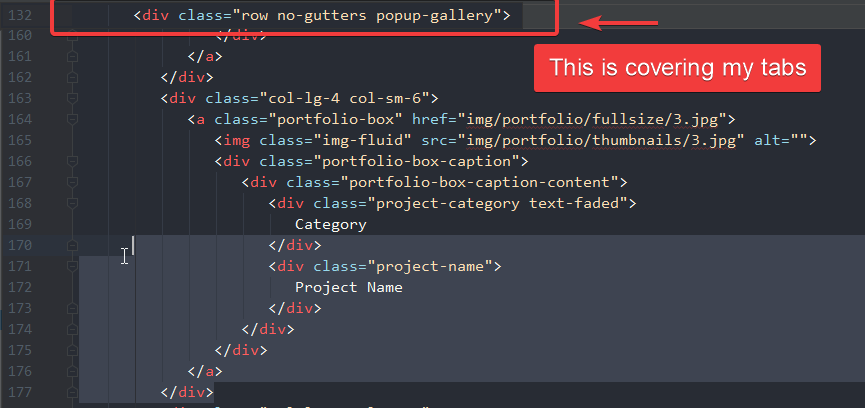
When I make a selection I get a tag preview that covers my tabs, I would like to turn that off.
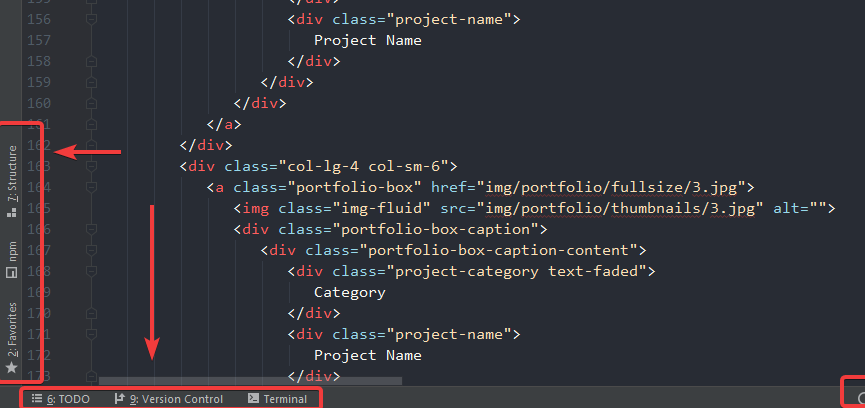
Here I would like to save my layout globally for all projects, in terms of placement, size etc..
Thx!
Please sign in to leave a comment.
As I can see there's no option to disable the preview. You can submit a feature request at our tracker to add one.
Btw I wasn't able to reproduce this using text selection. It should happen only while you're hovering the mouse over folded region: https://i.gyazo.com/5d43b391ada089ddc264669db5b95b98.gif
Second question: Window | Store Current Layout as Default
Thx for answering question 2.
For question 1, its easy to reproduce, my issue with it is that it takes a lot of my attention when doing a selection, check this:
https://i.imgur.com/1QdJoEO.gif
Please submit a usability issue: https://youtrack.jetbrains.com/newIssue?project=WI
Sorry, back to question 2, it doesn't seem to work for me. I have a specific side panels that I want to be the same for all projects, using "store current layout as default" and restoring it doesn't do anything when I switch to another project, what is it am I doing wrong?
But I still get this layout even when I click on restore default layout.
That's a bug unfortunately: https://youtrack.jetbrains.com/issue/IDEA-164818 =(