Task Description Windows blurred font
Answered

I'm using PyCharm EduTools (2018.2). But I guess that this is applicable to other EduTools as well.
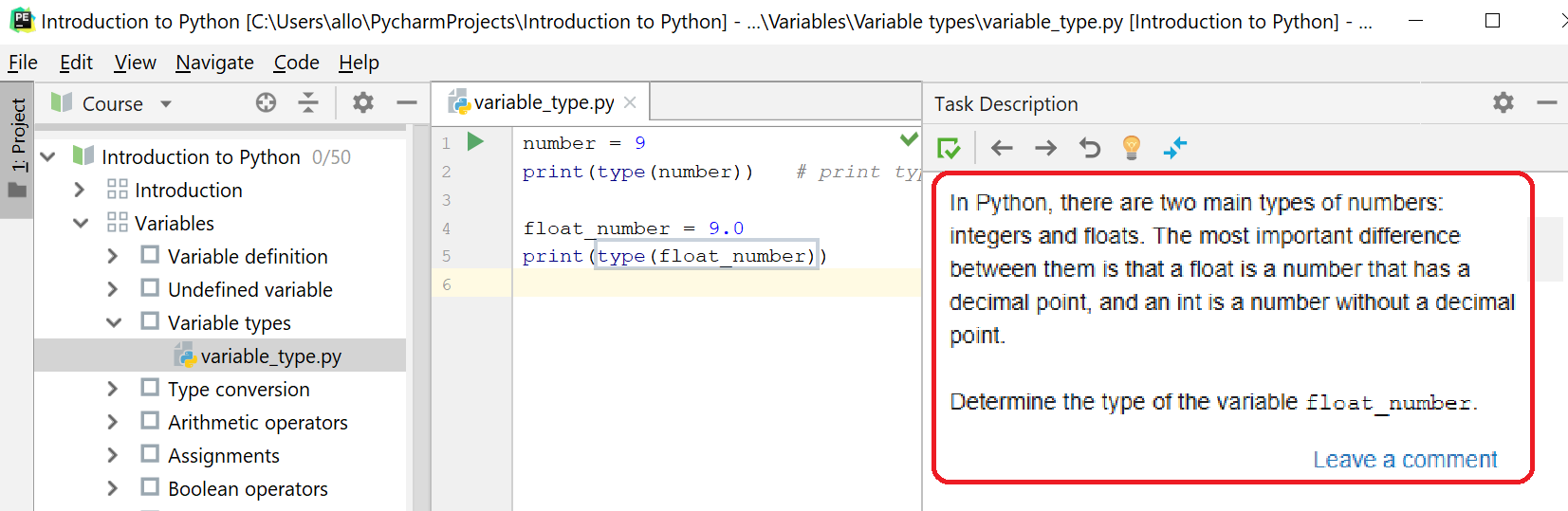
Everything looks great except the font in the "Task Description" window that is blurred (see below). I believe this can be easily fixed if I was able to change the font size for this window. But I couldn't fine this option in the Settings. Could you please help me with this?
Please sign in to leave a comment.
Hi!
Unfortunately, it is the problem of a library that is used to show a task description. I don't think that font change can help, but you can try. To change the font of Task Description you should change the editor's font (Editor->Font->Size).
You can try to add vm-option from this answer. To do this go to Help-> Edit custom VM options and add this line
Thank you, Valentina. Unfortunately neither of those options helps. Is there anything else that can be done?
Hi Catalinmarincia,
Try running under different 8 Java https://intellij-support.jetbrains.com/hc/en-us/articles/206544879
Hi!
You can try doing this:
1. Go to Help -> Find Action
2. Type in dialog: Switch Task Description Panel
3. Reopen project.