IntelliJ Project Tool Window Shows Different Folders Than Before

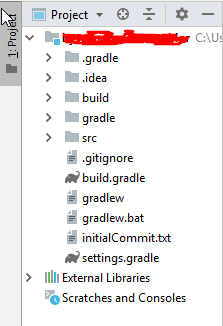
Say my current project is called project_x. Normally, in the Project ToolWindow the outermost directory displayed would be the directory project_x, alongside things such as External Libraries. Kind of the default, as one would expect.
However, IntelliJ displayed a message that I cannot exactly remember, but which said something like "an external change has occured". It then asked me whether I would like to rebuild the current project, and I did.
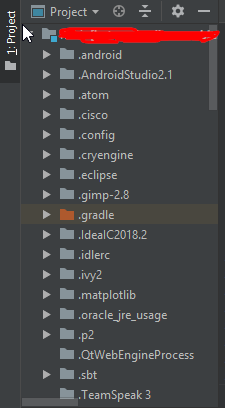
Problem: now, the outermost directory displayed is my User folder, i.e.: Username [project_x] -> IdeaProjects -> project_x
I find this annoying (especially since IntelliJ now tries to index every folder in my user-dir, which takes forever...), and would like to know how to revert back to the default settings. Help would be appreciated.
Edit: First screenshot is how it looks like, the second is how it SHOULD look like
Please sign in to leave a comment.
It has happened again in another project... this is so annoying...
I've posted the same question on SO. If you follow this link there will also be a screenshot:
https://stackoverflow.com/questions/53161481/intellij-project-tool-window-shows-different-folders-than-before
Edit: I've provided the screens now
Any help would be appreciated
Resolved by user: https://stackoverflow.com/a/53343414/104891.