Setting up PHPStorm

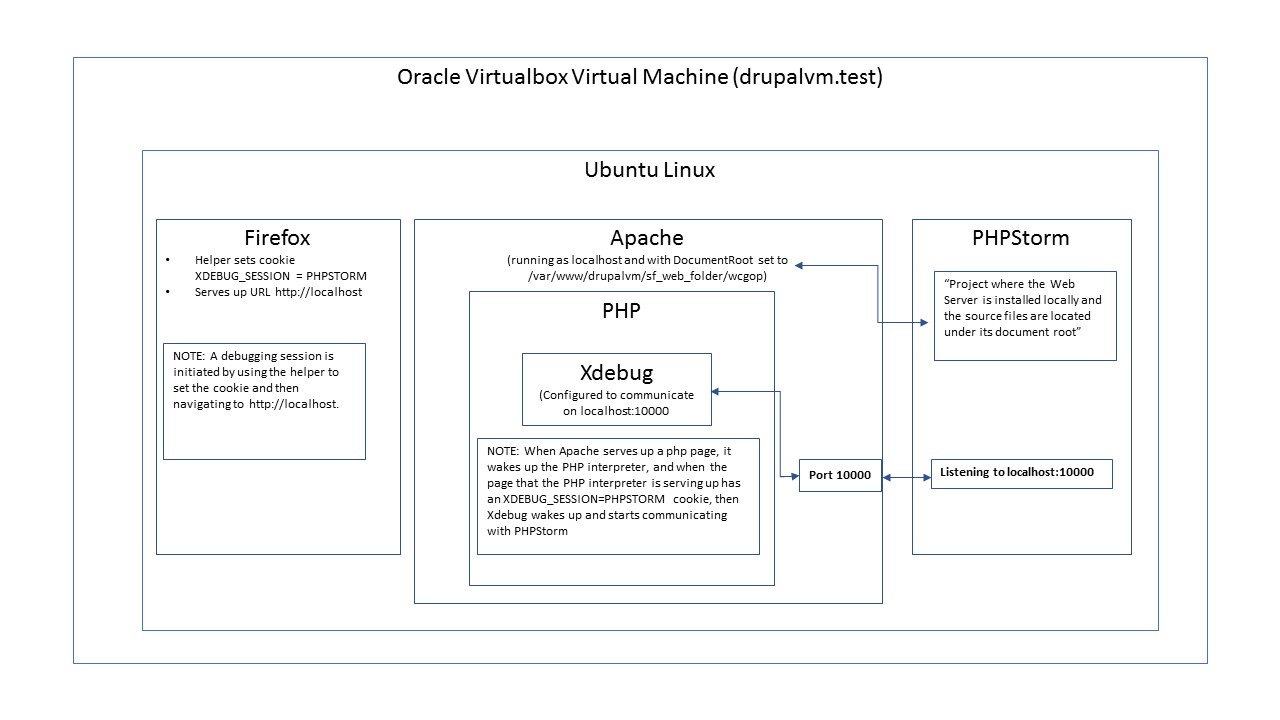 I spent quite a while trying to figure out how to get PHPStorm set up to work with my website, and finally constructed this diagram to help explain to myself how the pieces fit together. The reason for the Port 10000 instead of the 9000 default was that I kept running in to the "Cannot listen on Port 9000" error message. I don't know if this kind of diagram would be useful to others, or for that matter if it is even reasonably correct, and I am well aware that this is only one of many potential configurations of PHPStorm/Xdebug. I'm posting it in the hope that others might find it useful.
Please sign in to leave a comment.
According to my experience, the most common misunderstanding here is that people don't realize that it's Xdebug that initiates a TCP connection to PhpStorm, and not the opposite.
On your diagram, it looks like Apache is listening on port 10000 while it's not.
I'd remove this [Port 10000] block, and also set the arrow coming from [Xdebug] to [Listening to localhost:10000] to be one-directional, just to cover that misunderstanding.
Otherwise, it's a great diagram, thank you.
Thank you very much for the response.
I will change the diagram as you suggest, but in order to make it better I would like to understand how PHPStorm does communicate with XDebug. Suppose, for example, that you are paused at a breakpoint, and then decide to set an additional break point? Or, for that matter, click the "Step Over" icon? Surely PHPStorm would have to communicate with XDebug, and I thought that that was what the diagram showed. If PHPStorm and Xdebug don't communicate over Port 10000, how do they talk to each other?
Good stuff: https://xdebug.org/docs/remote#communication