The selected directory is not a valid home for Android sdk

I downloaded android sdk command line tool .
I extracted it and copied to a different folder . I tried adding it as follow :
But I got an error message stating the selected directory is not a valid directory for android sdk .
So I thought I should select anyone of tool or bin , and on selecting that too I got an error message stating "The selected directory is not a valid directory for android sdk " 
The following is how android-stuffs directory look like :  And the following is how the tools folder look like :
The following is how the bin directory looks like :
and the following is how the lib directory looks like :
I went through the following post :
https://intellij-support.jetbrains.com/hc/en-us/community/posts/360000004650-The-selected-directory-is-not-a-valid-home-for-Android-SDK
Here in comments I could see the OP mentioning that this message means that there is no android platform installed .
and OP ran the following commands :
sdkmanager platform\;android-27
to set things right . I too tried executing it but following is what I got :
I got all exceptions here . What to do in this case? How to add android sdk ?
Please sign in to leave a comment.
>sdkmanager platform\;android-27
>I got all exceptions here . What to do in this case? How to add android sdk ?
Looks like sdkmanager is not comparible with JDK9+ versions which is used when you run the tool. Update your JAVA_HOME to point to JDK 8 and make sure the PATH environment variable has only java binary from JDK 1.8, See https://stackoverflow.com/questions/50987969/cant-run-sdkmanager-bat-error-message-java-home-is-not-set
Apparently as it can be seen below I do not have JDK 8 :
 Can I download it from anywhere ?
The Oracle site: https://www.oracle.com/technetwork/java/javase/downloads/jdk8-downloads-2133151.html
@Andrey Dernov : I downloaded JDK8 . And created one system variable "JAVA_HOME" and one user environment variable with the same name.


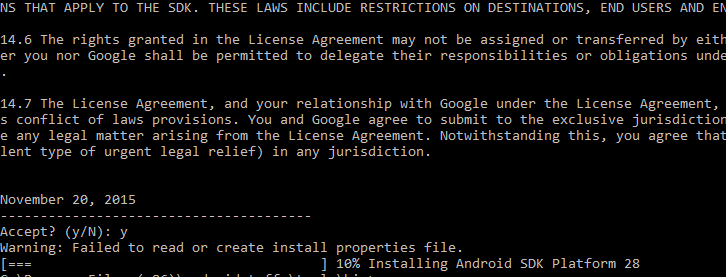

Now I ran the sdkmanager with the following command :
sdkmanager "platform-tools" "platforms;android-28"
This time it seemed like something is happening as I got the following output :
and the license acceptance stuffs .
Now it asked me to accept as the following :
Now on pressing "y" and enter I am getting the following :
and after this when I go back to android folder I see a new file called ".known Packages " present there as follows :
what to do next ?
Check these threads about the error:
https://stackoverflow.com/questions/43042032/android-studio-fails-to-install-update-error-failed-to-read-or-create-install
https://stackoverflow.com/questions/37951684/android-studio-failed-to-update-sdk-or-sdk-tools/42617940
which usually happens because of permissions. You need to allow your user to read/write to that folder or run cmd as administrator.
Better move Andorid SDK directory to your user home to avoid such issues in future.
Hi Andrey , your step step help is highly obliging . I am really thankful to you .

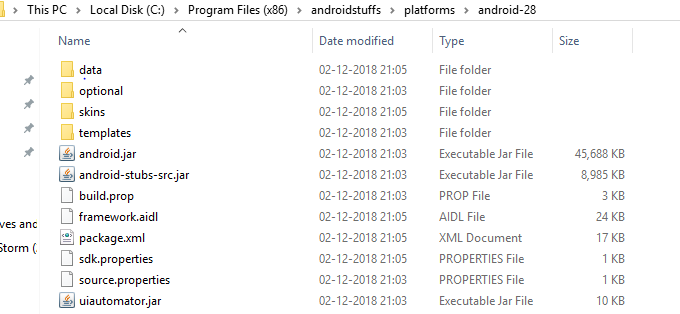

This time it worked well but after uzipping and all it looks like the following :
The platforms folder has an android28 folder inside which it is a s follows :
I could find skins and templates but could not find the rest of the stuffs in the screenshot attached in the following link :
https://intellij-support.jetbrains.com/hc/en-us/community/posts/360000004650-The-selected-directory-is-not-a-valid-home-for-Android-SDK
Is everything all right , is there naything to do next ?
So what happens when you select the androidstuff directory?
If you get the error make sure the permissions are correct. Try running IDE as administrator or install the SDK into user home directory.
Hi Andrey , Thanks again ..

I ran the IDE as an administrator and provided the androidstuffs directory as the path for android SDK . I got two drop-downs with each having one option ,
one said "Android 1.8" and the other said target platform "Android API 28" .
I selected them and proceeded to get the following :
So now what's next ? Was it all that was required for Android Dev using Kotlin ?
This is what was required to set up Android SDK. For Kotlin Android development refer to corresponding guides, e.g. https://developer.android.com/kotlin/
@Andrey : Thanks a ton again , Andrey
@Andey : I started the Android project following instructions in the link given by you .


It asked me to click on "install sdk" for installing any remaining component which are required like the following :
and then I ran the installation . On getting up in the morning I found that it has gotten stuck at the following :
Has it completed all the installations that are required ?
@Andrey : Moreover , when I have already installed the sdk manually why is it again doing that ?
Make sure to try latest version form https://www.jetbrains.com/idea/download
Attach idea.log after reproducing if problem remains.