missing binaries for apk to install?
Answered

Im trying to use a library that i use for Java development. Im trying to bring the functionality over to android but im getting these errors saying im missing native libraries...
INSTALL_FAILED_NO_MATCHING_ABIS: Failed to extract native libraries, res=-113i displayed my architecture with
System.getProperty("os.arch")and i got aarch64. What native library am i missing?
Please sign in to leave a comment.
Hello,
Please check this discussion for possible solution: https://stackoverflow.com/questions/36414219/install-failed-no-matching-abis-failed-to-extract-native-libraries-res-113
I have, no success.
This is my code.
public class MainPage extends AppCompatActivity {

    public static NetworkParameters BTCparams = TestNet3Params.get();
    public static WalletAppKit BTCkit = new WalletAppKit(BTCparams,new File("."),"BTC-Test");

    static String[] account;
    static String[] server;
    private Handler handler = new Handler();

    @Override
    protected void onCreate(Bundle savedInstanceState) {
        super.onCreate(savedInstanceState);
        setContentView(R.layout.activity_main);
        TextView tVBTCPer = (TextView)findViewById(R.id.tVBTCPer);
        TextView tVNull = (TextView)findViewById(R.id.tVNull);
        tVNull.setText(System.getProperty("os.arch"));
        DownloadProgressTracker BTCListener = new DownloadProgressTracker() {
            @Override
            public void progress(double pct, int blocksSoFar, Date date) {
                tVBTCPer.setText((int) pct+"%");
            }
            @Override
            public void doneDownload() {
                tVBTCPer.setText("100%");
            }
        };
        BTCkit.setDownloadListener(BTCListener).setBlockingStartup(false).startAsync().awaitRunning();
}
Do you install your application on Emulator or real device?
on my device, oneplus 3t.
*bump*
Please try to add packaging options inside android scope:
im running into a new error.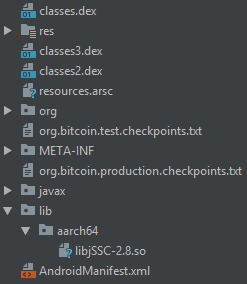
Although the new lines of code did omit the libraries it did not resolve the issue.
im still getting the...
i tried to disable instant run, clean project then rebuild project enable instant run and still nothing.Sorry, did you remove "splits" section from build script?
i did. i put it back, compiled and was able to launch it. Unfortunately it loads then crashes. I added some of the dependencies
dependencies {implementation fileTree(dir: 'libs', include: ['*.jar'])
implementation 'com.android.support:appcompat-v7:28.0.0'
implementation 'com.android.support.constraint:constraint-layout:1.1.3'
implementation('me.dm7.barcodescanner:zxing:1.9') { exclude module: 'support-v4' }
implementation 'com.journeyapps:zxing-android-embedded:3.2.0@aar'
implementation 'org.bitcoinj:bitcoinj-core:0.14.7'
api 'org.slf4j:slf4j-api:1.7.25'
implementation 'org.slf4j:slf4j-simple:1.7.12'
}
and now im not getting anything error wise.it loads a blank white screen stays for a second then shuts down with a dialog popping up and disappearing before i can read what it says.
Client not ready yet..Waiting for process to come online
Connected to process 24884 on device oneplus-oneplus_a3000-b6026923
Application terminated.
This is under the build tab...no errors.
Have you tried to debug your application to get crash dumps: https://www.loginworks.com/blogs/get-crash-logs-android-applications/ ?
C:\Users\Syn\AppData\Local\Android\Sdk\platform-tools>adb logcat AndroidRuntime:E *:S
--------- beginning of main
--------- beginning of system
--------- beginning of crash
01-15 10:54:37.313 27411 27432 E AndroidRuntime: FATAL EXCEPTION: WalletAppKit STARTING
01-15 10:54:37.313 27411 27432 E AndroidRuntime: Process: com.example.coinpayapp.coinpayapp, PID: 27411
01-15 10:54:37.313 27411 27432 E AndroidRuntime: java.lang.RuntimeException: java.io.IOException: Read-only file system
01-15 10:54:37.313 27411 27432 E AndroidRuntime: at com.google.common.base.Throwables.propagate(Throwables.java:160)
01-15 10:54:37.313 27411 27432 E AndroidRuntime: at com.google.common.util.concurrent.AbstractIdleService$2$1.run(AbstractIdleService.java:58)
01-15 10:54:37.313 27411 27432 E AndroidRuntime: at com.google.common.util.concurrent.Callables$3.run(Callables.java:95)
01-15 10:54:37.313 27411 27432 E AndroidRuntime: at java.lang.Thread.run(Thread.java:764)
01-15 10:54:37.313 27411 27432 E AndroidRuntime: Caused by: java.io.IOException: Read-only file system
01-15 10:54:37.313 27411 27432 E AndroidRuntime: at java.io.UnixFileSystem.createFileExclusively0(Native Method)
01-15 10:54:37.313 27411 27432 E AndroidRuntime: at java.io.UnixFileSystem.createFileExclusively(UnixFileSystem.java:281)
01-15 10:54:37.313 27411 27432 E AndroidRuntime: at java.io.File.createTempFile(File.java:2001)
01-15 10:54:37.313 27411 27432 E AndroidRuntime: at org.bitcoinj.wallet.Wallet.saveToFile(Wallet.java:1333)
01-15 10:54:37.313 27411 27432 E AndroidRuntime: at org.bitcoinj.kits.WalletAppKit.createOrLoadWallet(WalletAppKit.java:375)
01-15 10:54:37.313 27411 27432 E AndroidRuntime: at org.bitcoinj.kits.WalletAppKit.startUp(WalletAppKit.java:273)
01-15 10:54:37.313 27411 27432 E AndroidRuntime: at com.google.common.util.concurrent.AbstractIdleService$2$1.run(AbstractIdleService.java:54)
01-15 10:54:37.313 27411 27432 E AndroidRuntime: ... 2 more
01-15 10:54:37.317 27411 27411 E AndroidRuntime: FATAL EXCEPTION: main
01-15 10:54:37.317 27411 27411 E AndroidRuntime: Process: com.example.coinpayapp.coinpayapp, PID: 27411
01-15 10:54:37.317 27411 27411 E AndroidRuntime: java.lang.RuntimeException: Unable to start activity ComponentInfo{com.example.coinpayapp.coinpayapp/com.example.coinpayapp.coinpayapp.MainPage}: java.lang.IllegalStateException: Expected the service to be RUNNING, but the service has FAILED
01-15 10:54:37.317 27411 27411 E AndroidRuntime: at android.app.ActivityThread.performLaunchActivity(ActivityThread.java:2778)
01-15 10:54:37.317 27411 27411 E AndroidRuntime: at android.app.ActivityThread.handleLaunchActivity(ActivityThread.java:2856)
01-15 10:54:37.317 27411 27411 E AndroidRuntime: at android.app.ActivityThread.-wrap11(Unknown Source:0)
01-15 10:54:37.317 27411 27411 E AndroidRuntime: at android.app.ActivityThread$H.handleMessage(ActivityThread.java:1589)
01-15 10:54:37.317 27411 27411 E AndroidRuntime: at android.os.Handler.dispatchMessage(Handler.java:106)
01-15 10:54:37.317 27411 27411 E AndroidRuntime: at android.os.Looper.loop(Looper.java:164)
01-15 10:54:37.317 27411 27411 E AndroidRuntime: at android.app.ActivityThread.main(ActivityThread.java:6494)
01-15 10:54:37.317 27411 27411 E AndroidRuntime: at java.lang.reflect.Method.invoke(Native Method)
01-15 10:54:37.317 27411 27411 E AndroidRuntime: at com.android.internal.os.RuntimeInit$MethodAndArgsCaller.run(RuntimeInit.java:440)
01-15 10:54:37.317 27411 27411 E AndroidRuntime: at com.android.internal.os.ZygoteInit.main(ZygoteInit.java:807)
01-15 10:54:37.317 27411 27411 E AndroidRuntime: Caused by: java.lang.IllegalStateException: Expected the service to be RUNNING, but the service has FAILED
01-15 10:54:37.317 27411 27411 E AndroidRuntime: at com.google.common.util.concurrent.AbstractService.checkCurrentState(AbstractService.java:285)
01-15 10:54:37.317 27411 27411 E AndroidRuntime: at com.google.common.util.concurrent.AbstractService.awaitRunning(AbstractService.java:229)
01-15 10:54:37.317 27411 27411 E AndroidRuntime: at com.google.common.util.concurrent.AbstractIdleService.awaitRunning(AbstractIdleService.java:151)
01-15 10:54:37.317 27411 27411 E AndroidRuntime: at com.example.coinpayapp.coinpayapp.MainPage.onCreate(MainPage.java:92)
01-15 10:54:37.317 27411 27411 E AndroidRuntime: at android.app.Activity.performCreate(Activity.java:7009)
01-15 10:54:37.317 27411 27411 E AndroidRuntime: at android.app.Activity.performCreate(Activity.java:7000)
01-15 10:54:37.317 27411 27411 E AndroidRuntime: at android.app.Instrumentation.callActivityOnCreate(Instrumentation.java:1214)
01-15 10:54:37.317 27411 27411 E AndroidRuntime: at android.app.ActivityThread.performLaunchActivity(ActivityThread.java:2731)
01-15 10:54:37.317 27411 27411 E AndroidRuntime: ... 9 more
01-15 10:54:37.317 27411 27411 E AndroidRuntime: Caused by: java.io.IOException: Read-only file system
01-15 10:54:37.317 27411 27411 E AndroidRuntime: at java.io.UnixFileSystem.createFileExclusively0(Native Method)
01-15 10:54:37.317 27411 27411 E AndroidRuntime: at java.io.UnixFileSystem.createFileExclusively(UnixFileSystem.java:281)
01-15 10:54:37.317 27411 27411 E AndroidRuntime: at java.io.File.createTempFile(File.java:2001)
01-15 10:54:37.317 27411 27411 E AndroidRuntime: at org.bitcoinj.wallet.Wallet.saveToFile(Wallet.java:1333)
01-15 10:54:37.317 27411 27411 E AndroidRuntime: at org.bitcoinj.kits.WalletAppKit.createOrLoadWallet(WalletAppKit.java:375)
01-15 10:54:37.317 27411 27411 E AndroidRuntime: at org.bitcoinj.kits.WalletAppKit.startUp(WalletAppKit.java:273)
01-15 10:54:37.317 27411 27411 E AndroidRuntime: at com.google.common.util.concurrent.AbstractIdleService$2$1.run(AbstractIdleService.java:54)
01-15 10:54:37.317 27411 27411 E AndroidRuntime: at com.google.common.util.concurrent.Callables$3.run(Callables.java:95)
01-15 10:54:37.317 27411 27411 E AndroidRuntime: at java.lang.Thread.run(Thread.java:764)
this is what i got. I suspect that this is related to a permission for writing files. would i then have to grant storage permissions?
Also. the service running error is related to not being able to create/write to the wallet and spv chain. It needs to write to start properly.
i foudn the issue. It cant write to root folder. in process of figuring out.
making some more progress. the library for bitcoinj is being initialized but it has possible errors relating to other libraries.
[code]
public class MainPage extends AppCompatActivity{
    private static Context context;

    NetworkParameters BTCparams = TestNet3Params.get();
    WalletAppKit BTCkit = new WalletAppKit(BTCparams, new File(Environment.getExternalStorageDirectory().getAbsolutePath()), "file");

    static String[] account;
    static String[] server;
    private Handler handler = new Handler();

    public int BTCPer = 100;
    public int BCHPer = 100;
    public int ETHPer = 100;
    public int LTCPer = 100;
    public int XMRPer = 100;
    public int DASHPer = 100;

    public static Context getAppContext() {
        return MainPage.context;
    }

    @Override
    public void onWindowFocusChanged(boolean hasFocus) {
        super.onWindowFocusChanged(hasFocus);
        if (hasFocus) {
            hideSystemUI();
        }
    }
    private void hideSystemUI() {
        View decorView = getWindow().getDecorView();
        decorView.setSystemUiVisibility(
                View.SYSTEM_UI_FLAG_IMMERSIVE
                        | View.SYSTEM_UI_FLAG_LAYOUT_STABLE
                        | View.SYSTEM_UI_FLAG_LAYOUT_HIDE_NAVIGATION
                        | View.SYSTEM_UI_FLAG_LAYOUT_FULLSCREEN
                        | View.SYSTEM_UI_FLAG_HIDE_NAVIGATION
                        | View.SYSTEM_UI_FLAG_FULLSCREEN);
    }
    @Override
    protected void onCreate(Bundle savedInstanceState) {
        super.onCreate(savedInstanceState);
        setContentView(R.layout.activity_main);
        BackWork bwork = new BackWork(this);
        bwork.execute("server",null,null);
        TextView tVBTCPer = (TextView)findViewById(R.id.tVBTCPer);
        TextView tVNull = (TextView)findViewById(R.id.tVNull);
        tVNull.setText(getDataDir(this));
        DownloadProgressTracker BTCListener = new DownloadProgressTracker() {
            @Override
            public void progress(double pct, int blocksSoFar, Date date) {
                tVBTCPer.setText((int) pct+"%");
            }
            @Override
            public void doneDownload() {
                tVBTCPer.setText("100%");
            }
        };
        BTCkit.setDownloadListener(BTCListener).setBlockingStartup(false).startAsync().awaitRunning();
    }
    public void stProg (View v){
        if(BTCPer == 100 && BCHPer == 100 && ETHPer == 100 && LTCPer == 100 && XMRPer == 100 && DASHPer == 100) {
            if (account != null && account.length > 0) {
                if (account[3].equals("Blocked")) {
                    Intent intent = new Intent(this, Blocked.class);
                    startActivity(intent);
                } else if (account[3].equals("Active")) {
                    Intent intent = new Intent(this, Index.class);
                    startActivity(intent);
                } else {
                    Toast toast = Toast.makeText(this, "This account is not authenticated.", Toast.LENGTH_SHORT);
                    toast.show();
                }
            } else {
                Toast toast = Toast.makeText(this, "Please log in first.", Toast.LENGTH_SHORT);
                toast.show();
            }
        }else{
            Toast toast = Toast.makeText(this, "Please wait while syncing.", Toast.LENGTH_SHORT);
            toast.show();
        }
    }
    public void OnLogin(View v){
        BackWork bwork = new BackWork(this);
        bwork.execute("login","123","123");
    }
}
[/code]
I copied the error logs at https://pastebin.com/J40dJbrH
Im having some trouble properly reading the error logs but from what i can tell which hangs up on the creating file part. and the permission issue with writing to the files also.
this requires file.wallet and file.spvchain I ran a script with a different app to create those files.
Please try this suggestion: https://github.com/facebook/flipper/issues/146