It seems wrong keymap is shown in context menu
Answered

In context menu, `Run <file name>` is indicated as `Ctrl + Shift + R`, and `Debug <file name>` is indicated as `Ctrl + Shift + D`.
On the other hand, in the `Run` menu in the top of screen, they are indicated as `Ctrl + R` and `Ctrl + D`.
In my environment (macOS High Sierra 10.13.6 / IntelliJ IDEA ULTIMATE 2018.3), the latter keymap is correct ( I didn't modified the concerned keymap ).
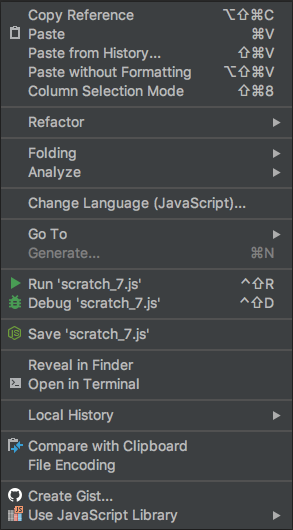
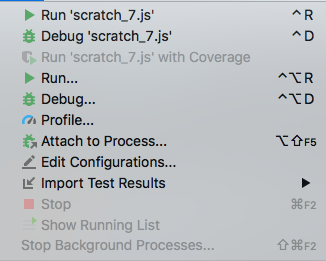
Is this some kind of bug?
Please sign in to leave a comment.
Hello,
"Ctrl+R" runs last used Run configuration. You could select any other configuration and "Ctrl+R" will run it while "Ctrl+Shift+R" will run "scratch_7.js"
Thank you for reply.
I see the difference.
But, in my environment , what work are only these three below:
- Pressing "Ctrl+R" on the editor space, resulting in running the file
- Select "Run <filename>" indicated as "Ctrl+R" in the top menu, resulting in running the file
- Select "Run <filename>" indicated as "Ctrl+Shift+R" in the top menu, resulting in running the file
Pressing "Ctrl+Shift+R" on the editor space do nothing. The "Run" panel doesn't also open at the bottom at all while it opens in the other cases above.
I don't have any other Run configuration than that of "scratch_7.js".
Is there any other points I have to check?
"Ctrl+Shift+R" works fine from the editor on my machine. Is it possible to share idea.log ("Help | Show log in...") after restarting IDE? Also please check that "Ctrl+Shift+R" is not assigned for some editor action.
Here is log: https://file.io/AawvjD
What I did is:
- Quit App
- Open App
- Select Project
- Open "scratch_7.js"
- Press "Ctrl+R"
- Press "Ctrl+Shift+R"
I confirmed that "Ctrl+Shift+R" is assigned for "Run Context Configuration" by this plugin
Please check it.
Sorry, but seems that link to log is broken. Could you please check it?
Oh, sorry.
How about this?
https://file.io/Wryvj0
I retried these steps today (2019/1/25).
- Quit App
- Open App
- Select Project
- Open "scratch_7.js"
- Press "Ctrl+R"
- Press "Ctrl+Shift+R"
Sorry, still "404 Page not found". Could you please try to use different sharing service?
Sorry...This will work, I think.
https://1.bitsend.jp/download/2e8895e99d5a118a6619747620f5dd8d.html
Thanks for the log!
Could you please try to update to the latest version (2018.3.4) and check the issue with new sample NodeJS project? All shortcuts work fine on my machine. The only difference is MacOS version - I'm on 10.14.2
Sorry for late reply.
I don't know why but they got to work fine after I upgraded macOS from High Sierra to Mojave and Intellij IDEA 2018.3.4.
Thank you :)
You are welcome!