TSLint Rule "object-literal-sort-keys" seems to be ignored with "match-declaration-order(-only)" set

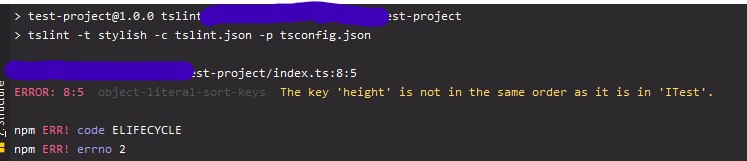
My Problem is that the TSLint rule "object-literal-sort-keys" with the configuration "match-declaration-order" or "match-declaration-order-only" set does not trigger an error as WebStorm inspection. But when running TSLint via its CLI it is shown as error.
Other rules or even setting the rule to its default configuration are triggering an inspection as expected.
I uploaded test-project.zip as minimal example via webform, with the following files:
package.json:
{
  "name": "test-project",
  "version": "1.0.0",
  "description": "",
  "main": "index.ts",
  "scripts": {
    "tslint": "tslint -t stylish -c tslint.json -p tsconfig.json"
  },
  "author": "",
  "license": "ISC",
  "dependencies": {
    "tslint": "^5.17.0",
    "typescript": "^3.5.1"
  }
}
tslint.json:
{
  "extends": ["tslint:latest"],
  "rules": {
    "object-literal-sort-keys": [true, "match-declaration-order-only"]
  }
}
tsconfig.json:
{
  "compilerOptions": {
    "noImplicitAny": true,
    "removeComments": true,
    "sourceMap": true
  }
}
index.ts:
interface ITest {
    height: number;
    width: number;
}

const test: ITest = {
    width: 100,
    height: 100,
};
npm run tslint show the error, WebStorm inspections does not:
Please sign in to leave a comment.
object-literal-sort-keys rule needs type info (https://palantir.github.io/tslint/usage/type-checking/)to use "match-declaration-order-only" or
"match-declaration-order-only"
Such rules are not currently supported by TSLint integration because of some technical difficulties: running TSLint with
--project tsconfig.json(required for such rules to work) would not be acceptable for us because it would cause a second instance of TypeScript to be created inside the TSLint process (in addition to the TypeScript instance used for compilation and highlighting, if you have it enabled) and would cause a noticeable performance degradation. While it may look thattslint --projectexecutes quickly when checking files before commit, the IDE needs to be more responsive when editing code.To work out the issue, we recommend using typescript-tslint-plugin.
To use it:
'plugins'intsconfig.json:disable TSLint in the IDE settings (Languages and Frameworks -> TypeScript -> TSLint) to avoid the same errors being shown twice. For additional configuration options, please see the typescript-tslint-plugin docs.
make sure to enable Typescript language service in Languages and Frameworks -> TypeScript
Thank you, the solution worked.
For others with the same problem: Also check your typescript version, for me it only worked with the latest version.