Clion 2019.1.3 Hangs Due to Inspections

Hi,
I am seeing that my Clion instance will hang/freeze indefinitely when code inspections are enabled. The hang can be triggered when the "static analysis" of the inspection for some file gets stuck at some percentage. Sometimes "ctrl + click" of any code element I am trying to get info on will cause the hang. If I do a top, there cpu for the java instance is not taking up any resources, so the hang seems to be caused by some type of a deadlock. I have to kill the java instance forcefully to exit out of clion. I am on a linux platform.
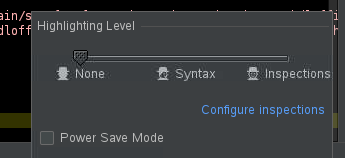
I have to leave the Highlighting Level of the inspection toolbar to none to avoid this problem( screenshot shown), however then I don't get any of the highlighting features of Clion which makes it not as usable. In summary, it appears enabling code inspections is creating conditions which lead to an indefinite hang making the feature useless for me. Any help resolving this would be appreciated.
Please sign in to leave a comment.
Update, even if I leave inspections to None, I still have Clion hang on me, so it is entirely unusable at this point.
Hello!
Please try using CLion 2019.2 EAP. Note that you don't need to uninstall the stable version in order to test the EAP build - they can be installed side-by-side.
Also in CLion 2019.2 EAP please enable memory indicator (
File | Settings | Appearance & Behavior | Appearance | Show memory indicator) and keep an eye on it for some time (the indicator will appear in the bottom right corner of the CLion window). If it is close to the limit at the time when you are experiencing the problems, then try increasing the Xmx JVM option according to this guide.If it doesn't help, please send automatically generated thread dumps located in the logs folder (
Help | Show Log in …) to clion-support at jetbrains.com.2019.2 didn't work for me, i got a java error shown below: