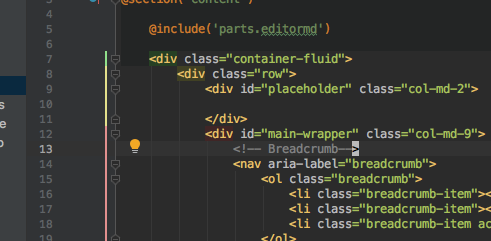
Hello, guys, how to hide this colorful line?

It seems not the line in this post:
It appears suddenly when I kick something, but not in other tabs only in this tab.
Thank you.
Please sign in to leave a comment.
Hi there,
That line shows you the HTML tags hierarchy so you can spot parent/enclosing tags more easily.
Settings (Preferences on macOS) | Editor | General | Appearance | Enable HTML/XML tag tree highlighting
Oh, I see...
It seems even I uncheck that, there's still a short one, but that's good to me.
And thank you very much...
>It seems even I uncheck that, there's still a short one, but that's good to me.
That's a current code folding section.
You can hide those +/- symbols by disabling "Settings (Preferences on macOS) | Editor | General | Code Folding | Show code folding outline"
As for the color -- I'm unable to locate the style for it (but it's definitely different for different themes). If I could (and if it exists/not somehow calculated at runtime) you could make it transparent or the same color as a background.
Glad to know that, and yes I disabled that.
But I found another strange problem:
This tab seems a bit wider than other tabs: code area to the line no. And it seems I can not do drag to make it small.
What happend?
As you can see from your first screenshot, that space is for gutter icons like (m) (o)up, breakpoints, bookmarks and alike.
Settings (Preferences on macOS) | Editor | General | Gutter Icons
Yes. Thank you... But I didn't see any setting of the width though.
But I'm ok with the little stain. My bad for I'm trying to make thing perfect.
If you disable showing of gutter icons, it will make gutter area smaller.
Yes...I do that way, and then close the IDE, restart it. And again enable the `show gutter icons`. It is OK now.
(I think previous colorful line enlarge the width even I disabled it. The distance remained.) Now everything works!
Maybe you were in Full Screen / Distractions Free / Presentation mode (see "View" menu) and it remained like that afterwards. No better ideas right now.