popup balloons obscure the code
Answered

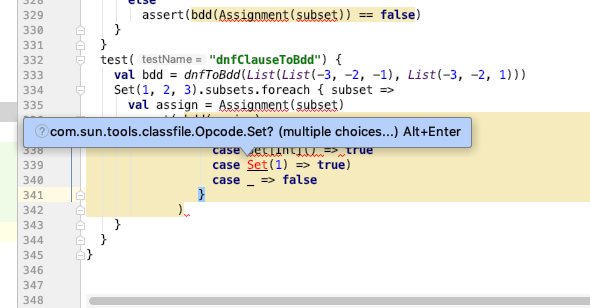
It is too often the case that the helpful popup balloons which IntelliJ provides, makes it difficult to see the code.
Here is a simple example. There is an error in the code which I'm trying to fix, but the blue popup balloon makes it impossible for me to see the matching opinion {. Is there some way that IntelliJ could figure out a saner place to put the messages. I don't want to turn them off, because their content is often helpful. But their placement is usually unfortunate.
Please sign in to leave a comment.
i've notice that other users have reported the same issue.
But it is unclear whether a bug has been filed.
This specific popup can be disabled here:
Thanks for the comment about disabling popups. However, as I stated in the OP, I don't want them disabled, because they or often helpful. I just don't want them to impede the editing. They should be placed somewhere, which allows the user to see what he's editing.
You can always trigger the popup using Alt+Enter when needed.
See also the relevant issues:
https://youtrack.jetbrains.com/issue/IDEA-55097
https://youtrack.jetbrains.com/issue/IDEA-199744