CustomComponentAction not rendering my custom component
Answered

I'm trying to design a component that will be in a toolbar sub item. But I cannot make it work. No matter what I put in createCustomComponent it renders a simple action.
I use this in my plugin.xml
  <actions>
    <!-- Add your actions here -->
    <group id="AsciiDoc" class="org.asciidoc.intellij.actions.asciidoc.AsciiDocActionGroup">
      <group id="AsciiDoc.TextFormatting" compact="true" description="Text Markup Actions" popup="true"
             text="AsciiDoc" class="org.asciidoc.intellij.actions.asciidoc.AsciiDocActionGroup">
        ...
        <group id="AsciiDoc.MyId" compact="true" description="Description"
               icon="AsciiDocIcons.EditorActions.TABLE" popup="true"
               text="Text" class="com.intellij.openapi.actionSystem.DefaultActionGroup">
          <action class="org.asciidoc.intellij.actions.asciidoc.MyCustomComponentAction"
                  id="org.asciidoc.intellij.actions.asciidoc.MyCustomComponentAction"
                  text="My text">
          </action>
        </group>
  </actions>
With that class:
public class MyCustomComponentAction extends AnAction implements CustomComponentAction {

  public MyCustomComponentAction() {
  }

  @Override
  public void actionPerformed(@NotNull AnActionEvent eve) {

  }

  @Override
  @NotNull
  public JComponent createCustomComponent(@NotNull Presentation presentation) {
    JComboBox jComboBox = new JComboBox( new String[]{ "haha", "hehe" } );

    return jComboBox;
  }

}
And it renders as this: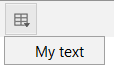
Any idea on what I missed?
Please sign in to leave a comment.
Custom components are not supported for menus.
You can remove `popup="true"` from "AsciiDoc.MyId"/"AsciiDoc.TextFormatting" groups, and the combobox should become visible on toolbar.
Ho that's too bad that it's not supported in menus, thanks for your help.
You can show a custom popup menu when toolbar button is clicked and have full control over it.
Smth like this: https://github.com/JetBrains/intellij-community/blob/a0e582f54c47c87bf7d13246b7ffa3db4053342b/platform/vcs-impl/src/com/intellij/openapi/vcs/changes/actions/SelectChangesGroupingActionGroup.kt
`com.intellij.openapi.ui.popup.JBPopupFactory` or `com.intellij.ui.popup.WizardPopup` could be a starting point.