Select home directory dialog can't select a directory

I want to select a new home directory for JDK, as I want to use a newer JDK. However, when selecting NEW -> JDK in the Project SDK settings, a Windows XP style dialog opens up, in which I can only select files and not directories. When I select an arbitrary file in the directory I really want to select, nothing happens.
This is the dialog I get:
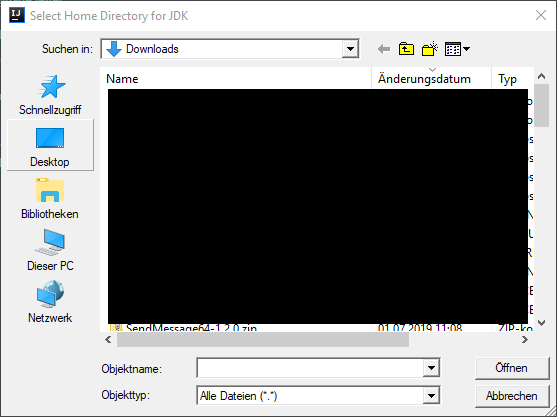
This also applies to other projects, I have already invalidated my Caches and I'm sure it has worked once upon a time. This is the result I receive from "About":
IntelliJ IDEA 2019.1.3 (Ultimate Edition)
Build #IU-191.7479.19, built on May 28, 2019
Licensed to DPS Engineering GmbH / Timo Borner
You have a perpetual fallback license for this version
Subscription is active until June 18, 2020
JRE: 1.8.0_202-release-1483-b58 amd64
JVM: OpenJDK 64-Bit Server VM by JetBrains s.r.o
Windows 10 10.0
Please sign in to leave a comment.
IDE should show its own dialog, I can't get the Windows default dialog when following your steps on Windows 10.
Did you override any IDE settings?
Please share the logs: https://intellij-support.jetbrains.com/hc/articles/207241085. You can upload the files via https://uploads.services.jetbrains.com/.
You can follow the process of this problem, including the log files, here:
https://youtrack.jetbrains.com/issue/IDEA-218339
And actually I have quite a few settings, see my settings repo:
https://github.com/MetaColon/Settings
Note that deleting the .IntelliJidea2019.1 folder fixed the issue - this is not a great solution though. This does not mean, that there's a proper explorer, because there isn't. It just defaults to the newest Java version, after having forgotten that an old version was selected, which works in my case.