where is the Git pull show what changed view in 2019.2 ?

I've just updated to the latest phpstorm version. Previously when I did a GIT -> PULL all the changed files would show in the VERSION CONTROL panel, then I could do CMD + D and browse over what changed over all the different merges.
Today that view is not showing up. Instead im seeing a list of the individual commits.
Has the "Everything that's changed" view been removed? It was very useful to see how the overall state of everything has changed.
Is there a way to get it back?
PhpStorm 2019.2
Build #PS-192.5728.108, built on July 24, 2019
--edit-
This view:
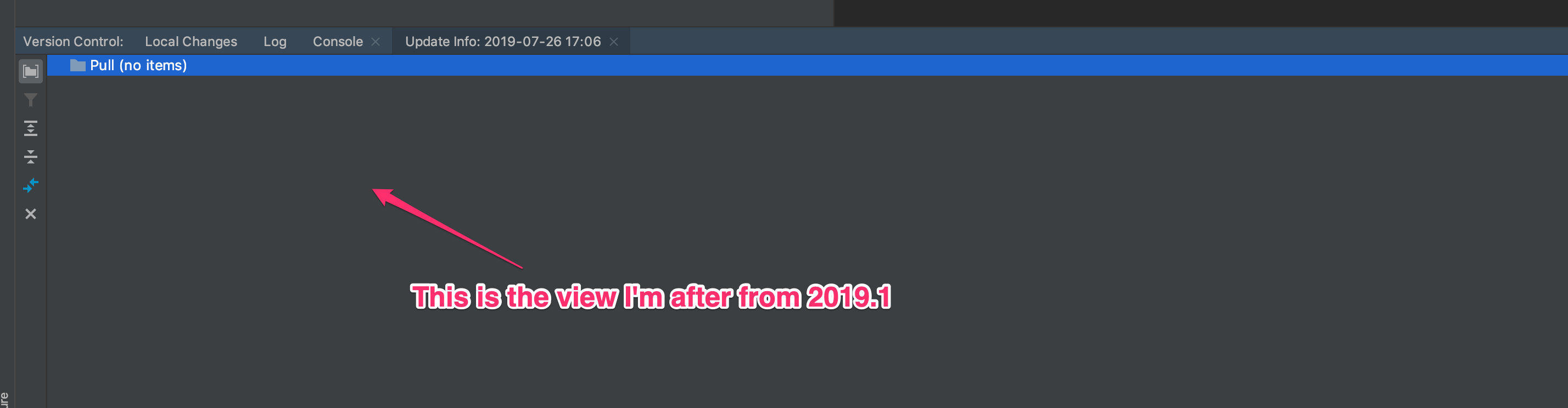
Another screenshot:

Please sign in to leave a comment.
Here's a better view of it: Its the screen that showed whats changed since last pull.
WHY IS IT IMPORTANT? : Because if when I pushed the value for $color was 'red', I don't care that it went 'blue','yellow','green','orange' then finally settled on 'purple'. All I want to know is what is was before the pull and what it is now. Anything further I can look up.
This screen is extremely useful in catching introduced bugs.
Gone back to 2019.1.3 for now. Hopefully it still exists somewhere in 2019.2
It seems that there's no way to switch to the previous view, at least I didn't find it.
Please submit a usability issue using this template:
https://youtrack.jetbrains.com/newIssue?project=IDEA&c=Type%20Usability%20Problem&c=Assignee%20Kirill.Likhodedov&c=Subsystem%20Version%20Control.%20Git&c=relates%20to%20IDEA-52643
Thanks Eugene. Request submitted:
https://youtrack.jetbrains.com/issue/IDEA-219719
The result is:
We believe that the new view provides more information in a more structured and convenient way. Although we understand that there are cases when the previous view could be more useful in certain conditions, there are no plans to return to the previous view.
This is such a shame:(
I can just do a git log on the terminal to get what we are being presented with now! If the argument is that this is more informative, there are much better tools for it like sourcetree.
The old view was useful in so many ways and if you needed change history you can drill down or use the git history view. Soo disappointing!
Instructions have been provided here by Dmitriy Smirnov to show how to get the old view back:
https://youtrack.jetbrains.com/issue/IDEA-218366
They are:
Help - > Find Action (or Ctrl+Shift+A), Search for Registry..
In the dialog, that pops up, search for
git.update.project.info.as.log.You can do this by typing any part of the option name.
Thanks Dmitriy Smirnov.
Thank you Dmitriy Smirnov for finding this. But guess what, now I can't deploy the files that were created/updated. The fact that the Intellij team chooses not to listen to their paying customer's demands is very disappointing, and if they are walking on this path I might reconsider renewing my license for their products.
The deploy option is there for me after going back to the old view @flaviuspopoui
I figured it out eventually, thank you!
Rolling back in 2020.1 does not seem possible (anymore).
It is not clear to me why they even remove functionality, it is there for a reason.
A request to vote for: https://youtrack.jetbrains.com/issue/WI-48402