Disable collapsed comments highlight and preview Intellij IDEA
Answered

Hi everyone,
I'm new to Intellij IDEA and wanted to start with good comments using its integrated Javadocs.
The issue is: The javadocs commenting can get crowded with large amounts of parameters and makes the code annoying to read. I thus thought to collapse and expand comments using shortcuts but as you can see, they are highlighted and provide a preview which, although better, catches the eye too easily.
Example of the issue:
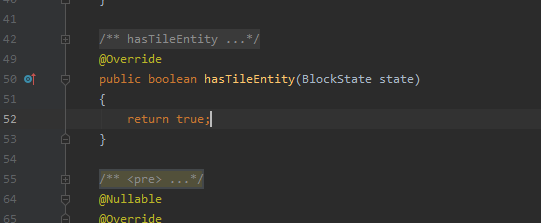
So I would like to know if there is a way to sort this issue to allow no highlight and no preview,
Thanks!
Please sign in to leave a comment.
What do you mean by no highlight? Note that you can change the style of the folded fragments:
Serge Baranov,
I meant yes, as you show, the background for folded text, it has helped
thanks!