WebLogic 12.2.1.3.0 Config Password Keeps Changing
Answered

I have a couple run configurations for WebLogic server version 12.2.1.3.0 within my workspace for IntelliJ IDEA 2019.2.1. Below is more or less how all my configurations are set up:

For whatever reason the password keeps changing to something invalid every single time I restart IDEA. I have to manually change it to the correct password before starting the server or else I get an Oracle error informing me the server couldn't be connected.
<BEA-090078> <User weblogic in security realm myrealm has had 5 invalid login attempts, locking account for 30 minutes.>
Has anyone else ran into this issue with this version of IDEA/WebLogic?
Please sign in to leave a comment.
Hello John,
Please attach screenshot from "Settings | Appearance & Behavior | System Settings | Passwords"
Yaroslav,
Screenshot attached:
John,
Please try to temporarily switch to "Do not save" passwords, recreate your Run configuration and restart IDE.
Yaroslav,
That did not seem to resolve the issue. Password was blank after I restarted. I re-entered the password into the new run configuration, but keep having to re-enter it or else the server doesn't connect.
John,
Am I got you right that now password field is filled, but you still need to enter password before running? Could you share idea.log ("Help | Show Log in...") after restarting IDE and reproducing the issue?
Yarosloav,
No, after disabling the password save, the password field is now blank every time I start the IDE. Is there an email where I can send the log?
Use this form: https://intellij-support.jetbrains.com/hc/en-us/requests/new?ticket_form_id=66731
Please restart IDE, reproduce the issue and attach idea.log. Thanks.
Also try re-creating the Run/Debug Configuration from scratch.
Andrey, submitted my log at the link you provided.
Yaroslav/Andrey,
I'm not sure what happened but I haven't been seeing this issue in over a week. I think maybe when I disabled the password save and then re-enabled it something was fixed. At any rate just wanted to thank you guys for your help and that I'm considering this as resolved for now.
Thank you for letting us know.
One year and this is still an issue. Happening with weblogic 11 and 12c
Please report at https://youtrack.jetbrains.com/newIssue?project=IDEA with the steps to reproduce.
The Problem persists.
Actually, on my machine, the issue appeared only recently. But my work colleague has it since we started testing the IDE (February 2023). A difference in our settings I know is, that my colleague used the exploded ear, but I always have been using the standard ear until recently, when I tried to also use the exploded ear. That was around the same time when I received the error myself, I also updated to 2023.2 around that time.
But I can't of anything how the selected type of ear chould affect the storing of password.
The workaround is, simliar as mentioned by John White, to change the username/password data, save it and change it back to the correct one.
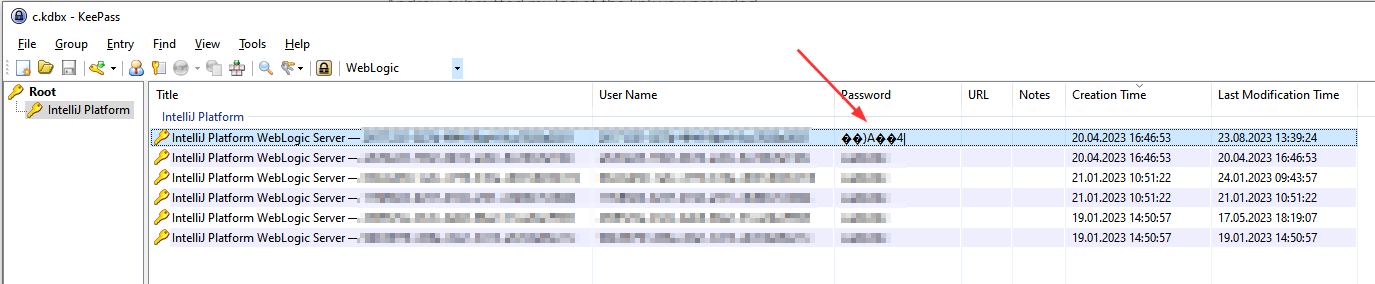
Anyhow, my c.kdbx looks suspicious:
Is this the current ticket or is there another one for that problem? Serge Baranov
There is an old incomplete bug report at https://youtrack.jetbrains.com/issue/IDEA-218135.
Feel free to create a new one if you have the steps to reproduce it.
@...
Could you please reproduce the issue and provide your IDE logs (Help > Collect Logs and Diagnostic Data) together with steps to reproduce in a new report on our issue tracker: https://youtrack.jetbrains.com/newIssue?project=IDEA&draftId=25-4759964
It is more convenient to continue troubleshooting the problem there. Thank you!
Serge Baranov / Ivan Pajic
Thank you for the prompt response! I will do so, as soon as the problem emerges again.
Cheers.
EDIT: I have created this issue: https://youtrack.jetbrains.com/issue/IDEA-331368