IDEs incorrectly presume macOS in "Dark Mode"...

I'm seeing a problem with basically ALL JetBrains IDE-based apps (EAP 2019.3): AppCode, DataGrip, PyCharm, CLion, IntelliJ, etc. The OS file dialogs present with the JetBrains-added portion showing light-text-on-dark, while the rest of the dialog is 10.13.6-normal "dark-on-light" color, which renders ALL text in the OS dialog unreadable (though colored icons appear fine).
Digging into it further GUI-wise, it appears that for whatever reason, the IDE is presuming that even older macOSes can support "Dark Mode" and thus changing it's palette accordingly for the dialog -- which'd be great, but 10.13 (and prior) DON'T support "Dark Mode" and for them the dialogs' text (file names, properties, etc) all appear as white-on-white, unreadable. Screen capture of problem attached:
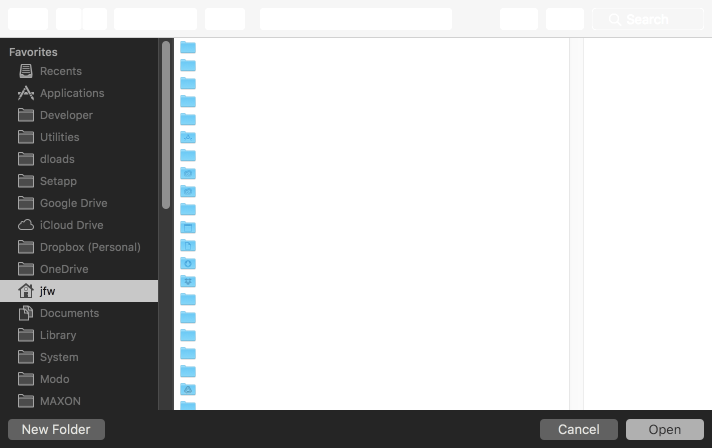
MacPro5,1 (Mid-2012) 2x 2.4GHz 12c/24t; macOS 10.13.6; 32GB RAM
Please sign in to leave a comment.
Just to clarify, this is occurring when JetBrains IDEs are set in their "Dark Mode" (light-on-dark color themes).
Further, whether macOS 10.13.6 General pref for "Dark menu bar and dock" is set on or off has no effect, the OS file dialogs look the same regardless. Even if I disable DefaultFolderX, it has zero impact on the coloration used by the IDEs for the OS file dialogs, as long as they are using light-on-dark themes, the OS file dialog text is show as "white-on-white". Fix or workaround needed ASAP, as changing to dark-on-light theme for app gives me eyestrain while working (and is only thing that yields readable OS file dialogs with JetBrains IDE apps on 10.13.6 for me right now).
Hey, man, I'm having the same problem, which makes me confused and I have to use a white theme.
MacOS: 10.13.6
IDEA: 2019.3
In addition, I noticed that after version 2019.3, the [Use dark window headers] was canceled. Can this be restored?
Because of the dark title bar, this doesn't work well on lower versions of macOS.
Hello,
This problem has been fixed: https://youtrack.jetbrains.com/issue/IDEA-228316
We plan to deliver the fix as soon as possible (likely in version 2019.3.1).
Sorry for the inconvenience.