IntelliJ doesn't display accents properly
Answered

Hi, I'm trying to run a simple program that has accents:

In the editor, it displays properly, but when I run the program, it doesn't:
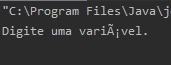
This could be because I've imported the program from Eclipse. The decoding settings are set to UTF-8.
Do you have any leads?
Please sign in to leave a comment.
What're your Intellij, OS and JDK versions? I'd recommend to open a support ticket and attach idea.log file (Help | Show Log..) there?
IntelliJ:
IntelliJ IDEA 2019.3 (Community Edition)
Build #IC-193.5233.102, built on November 27, 2019
Runtime version: 11.0.4+10-b520.11 amd64
VM: OpenJDK 64-Bit Server VM by JetBrains s.r.o
Windows 10 10.0
GC: ParNew, ConcurrentMarkSweep
Memory: 988M
Cores: 8
Registry:
Non-Bundled Plugins: hunspell
OS: Windows 10 64x
JDK: 13.01
Log: https://pastebin.com/iTkmS5sk
Can you show the "Preferences | Appearance & Behavior | System Settings | Updates" screen? Does it help to check for plugins updates manually? Main plugins are not compatible with your verssion of Intellij, it's a known bug.
Fixed it. I had to convert the file, now it's working.