public/js excluded from Find in Path search

While searching in the root directory of my project using 'Find in Path', files in the public/js directory get ignored. It's the same results if I start from the 'public' directory. However if I start at the 'js' directory it will not get ignored.
I can see in the Project tree that the directory appears in Orange:
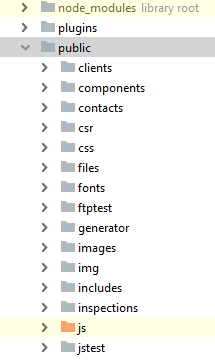
However I can't find what setting causes this. Under Settings->Directories it's not part of the excluded directories. I could see many cases where this directory should be ignored, but this doesn't apply to this project.
Please sign in to leave a comment.
`public/js` directory is excluded from indexing, that's why it doesn't appear in search result unless you choose it explicitly as a search scope.
can it be un-excluded via Mark directory as/Cancel exclusion (or Not excluded) in folder right-click menu?
Also, do you use webpack in your project? WebStorm auto-excludes webpack destination folder for better performance. So, if you have smth. like
In your
webpack.config.js, thejsfolder will be auto-excluded.Thanks Elena!
That's exactly what happened. I do have that in my webpack.config.js, however it only applies to two files in the js directory.
The Mark Directory as -> Not Excluded worked! Not sure why I couldn't find that before.
I'd like to exclude those two files from indexing. I tried adding the paths to Settings->Directories->Exclude Files, but they're still showing up in the search. I suppose I could work around it by nesting them in a deeper folder.
Thanks for your help!
>I tried adding the paths to Settings->Directories->Exclude Files, but they're still showing up in the search.
please vote for IDEABKL-7522 to be notified on any progress with it; you can try a workaround mentioned in https://youtrack.jetbrains.com/issue/IDEABKL-7522#focus=streamItem-27-2024141.0-0