Why are some modules underlined in red in the tool window if all dependencies are enabled?
Answered

Hi!
I have:
IntelliJ IDEA 2019.3.1 (Community Edition)
Build #IC-193.5662.53, built on December 18, 2019
Runtime version: 11-ea+121 amd64
VM: OpenJDK 64-Bit Server VM by JetBrains s.r.o
Linux 4.15.0-74-generic
GC: ParNew, ConcurrentMarkSweep
Memory: 1204M
Cores: 6
Registry:
Non-Bundled Plugins: DBN, Lombook Plugin, OdpsStudio, com.jetbrains.ChooseRuntime, marcglasberg.HibernateInspectionsPlugin, org.dnltsk.mapfileplugin, org.jetbrains.kotlin
I work with a multi-module gradle project (12 modules).
For some reason, in the tool window, some modules are underlined in red, although all dependencies are allowed.
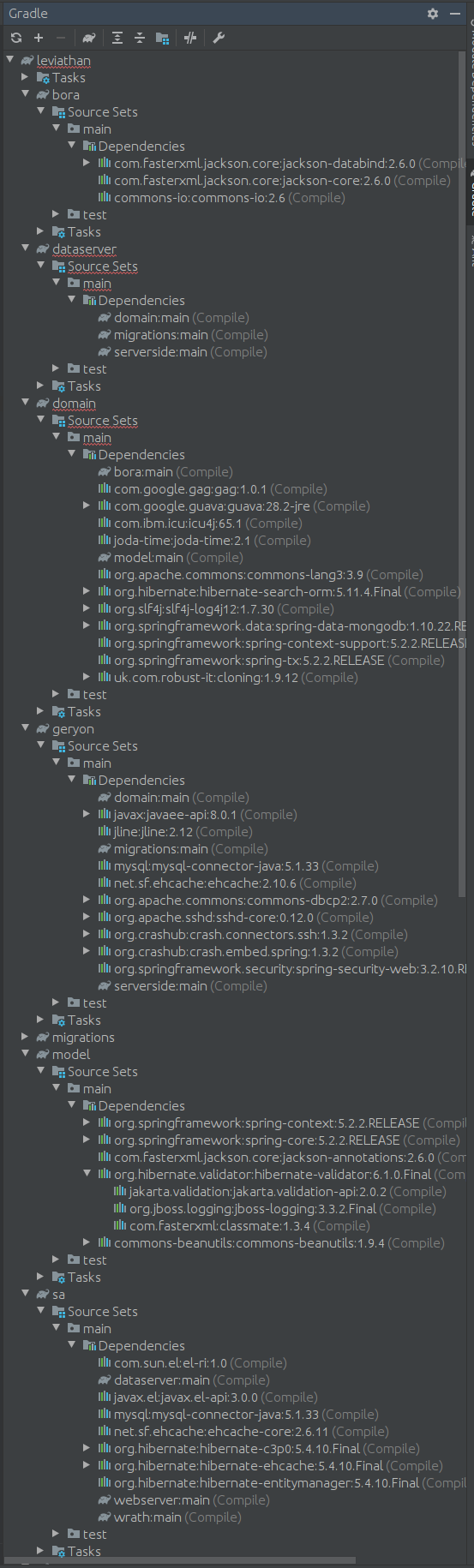
How to get rid of it?
Please sign in to leave a comment.
Can you build the project (Build | Rebuild Project action) successfully? Is there any tooltip shown when you hovering over this error?
This might be the https://youtrack.jetbrains.com/issue/IDEA-227568 Could you attach screenshot of File | Settings | Build, Execution, Deployment | Build Tools | Gradle settings page and idea.log file after IDE restart and trying to re-import project in Gradle tool window? Thanks.
For uploading you can use ftp://ftp.intellij.net/.uploads / https://uploads.services.jetbrains.com or any file sharing service.
The problem disappeared yesterday, but at what point - I did not notice.
The project was built and launched, but I did not see any tooltip.
But it was definitely not this problem (https://youtrack.jetbrains.com/issue/IDEA-227568?_ga=2.124384905.2091632718.1578896851-952176289.1575290145).
Here is a screenshot of the settings. They did not change.
Apparently, the idea.log is now not relevant?
Thank for the information. If you have idea.log file containing the time period when issue happened it would worth to check it still. Thank you.
I downloaded the idea.log file from this link https://uploads.services.jetbrains.com/?_ga=2.86030107.2091632718.1578896851-952176289.1575290145
Thanks. Unfortunately see no issues on 14th in log file. Only one INFO message
but it does not look like it can cause the issue.