Gradle transitive dependencies not visible/debuggable

Hello I have the following issue:
I have an app with Dependicies to Module1 which does depend (via implementation scope) on Module2. Everything compiles and works as expected. I cant access/use any Class inside of Module2, which is exactly what I want to prohibit.
My Issue is that, when an exception/stactrace originates in Module2 IntelliJ does list the exact line where it happened, but i cant jump to this Class neither can I find it via double shift nor can I set breakpoints there.
All modules are written by my company and are under our control.
How can I get IntelliJ to "resolve" Classes from Module2 for debugging purposes, but prevent consumers to import and use them. Currently I need to add Module2 explicitly as dependency so that IntelliJ can access it for debugging, but then the Classes of Module2 can leak into the app, which I purposefully wanted to prevent via transitive 'implementation' dependency scope.
This happens in Android Studio and IntelliJ Ultimate
Please sign in to leave a comment.
Hello,
Am I got you right that you'd like to be able to get sources without adding them to project?
Sources would be the best option, yes. But it would already be nice to have the option to go to the decompiled class.
I'm not able to access my transitive (via implementation) modules like its not possible to access the FileOutput.java in the screenshot below (not associated with my example/code)
Is it possible to attach sample project example demonstrating the issue?
Sorry it took me some time... here you go:
please clone: https://github.com/ataraxus/gradletransitiveissue-lib.git
build it, via
So all artifacts are locally present.
clone https://github.com/ataraxus/gradletransitiveissue.git
Start/build the android project and you will get the output below:
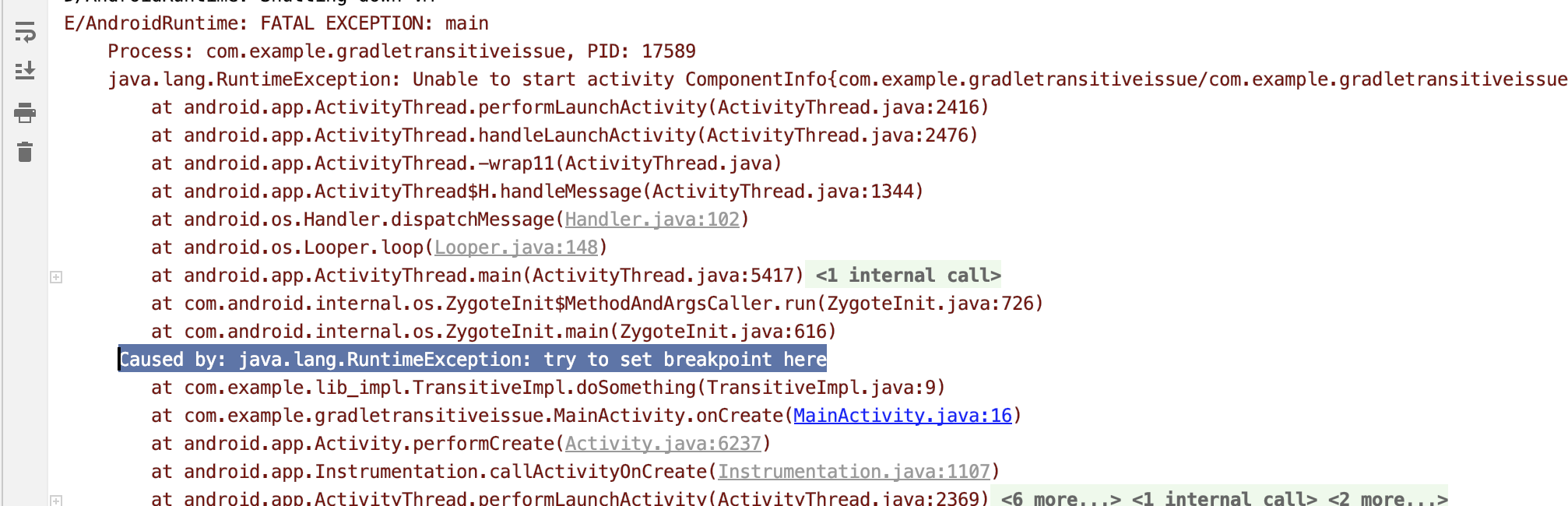
I would like to have the possibility step into "TransitiveImpl.java" at least into the decompiled version or even nicer into the source :)
Hello. I was not able to reproduce the exception above, the project compiles without errors. Could you please provide idea.log and build.log (Help | Show log...) after reproducing the problem?
Hey Petr,
thanks for checking the issue. There is no issue with compiling the project at all. The exception happens, when starting the app. I put this exception there on purpose to highlight, that IntelliJ doesnt allow to jump to the source of the exception aka "TransitiveImpl.java:9" the above screenshot shows, that this class is not displayed as link.
Any chance to get an update on this issue? It's quite annoying for multi module projects :(
@...
Hi.
I apologize for the delay. After playing around a bit with your project, I can see that for a simple java case, "impl" is added as a `runtime` scope dependency, with expected behaviour: classes are not available in the editor, but are highlighted in stacktraces.
AAR (Android library) is handled differently, but this should be handled by Google's Android Studio team. Please report as instructed here: https://developer.android.com/studio/report-bugs