Formatting form-script as JavaScript

I have inherited quite a bit of code (about 200.000 lines) and am working my way though it. There is a lot of JavaScript in the HTML that is marked form-script so the code is not formatted as JavaScript. All I would like to do is set anything in IntelliJ that has:
<script cam-script type="text/form-script">
// javaScript goes here
</script>
to be set as JavaScript (because it is JavaScript, it is just marked as FormScript so that the browser does not run it after page load - we are using Camunda for modelling). I found this in the forum:
https://forum.camunda.org/t/formatting-text-form-script-as-javascript-in-intellij/711
which seems exactly what I want, it seem to have been for an older version as I cannot get this to work in the current IntelliJ version (2019-3-3). I tried creating a new language injection but was not sure what to enter in the relevant fields:
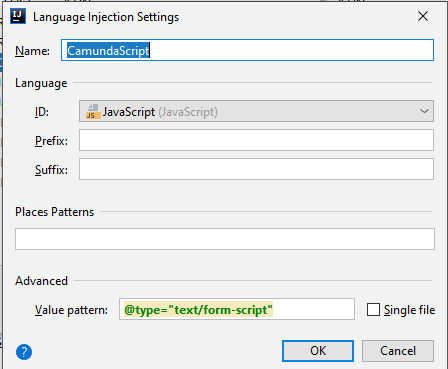
could somebody please let me know what I need to add to the various fields?
Thank you in advance
PS: this is my first time using IntelliJ so if this is already available and I have just not found it please let me know 😊
Please sign in to leave a comment.
The following injection should do the thing:
Elena Pogorelova -> Thank you very much, that did the trick. The only thing to note is when creating the new injection you need to create a XML Tag injection and not a JavaScript injection as I was creating - then you get the extra XML Tag section.