Gradle - Intellij Plugin cannot find API Symbol
Answered

Hi,
I'm trying to update an old plugin (built for IDEA 2017), which adds support for a custom language, the code imports api such as
import com.intellij.psi.JavaTokenType;
which the IDE by default doesn't find, if I edit the project sdk to a Intellij Platform Plugin SDK, IDEA can find all the symbols, but still the gradle project does not build. I've tried to edit the Gradle JVM but it did not help at all.
My build.gradle
plugins {
    id 'java'
    id 'org.jetbrains.intellij' version '0.4.10'
}

sourceSets {
    main.java.srcDirs = ['src/main/java']
}

group 'org.example'
version '1.0-SNAPSHOT'

sourceCompatibility = 1.8


repositories {
    mavenCentral()
}

dependencies {
    testCompile group: 'junit', name: 'junit', version: '4.12'
}

// See https://github.com/JetBrains/gradle-intellij-plugin/
intellij {
    version '2019.3.3'
}
patchPluginXml {
    changeNotes """
      Add change notes here.<br>
      <em>most HTML tags may be used</em>"""
}
Please sign in to leave a comment.
Hello Mattia,
You need to add a dependency to the Java plugin.
Phrase review the Notes about Module and Plugin Dependency section:
https://www.jetbrains.org/intellij/sdk/docs/basics/getting_started/plugin_compatibility.html
Thank you! Editing the build.gradle solved the issue
intellij {version '2019.3.3'
plugins = ['java']
}
I'm sorry, maybe this is a question more related to the Java language rather than the Plugin development, but whenever I try to use a java token type anywhere in the code it gives an error like this one: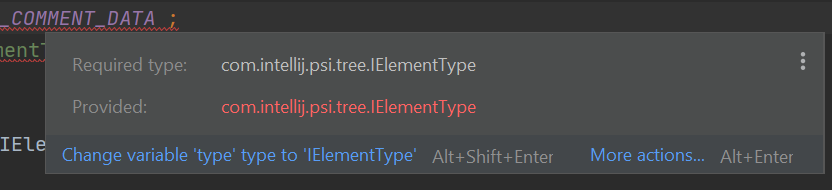
I've tried type casting the variable but that also throws an error
Please make sure, you're using Java 1.8 (also for the Gradle)