Help! Pycharm failed to open Radeon drivers

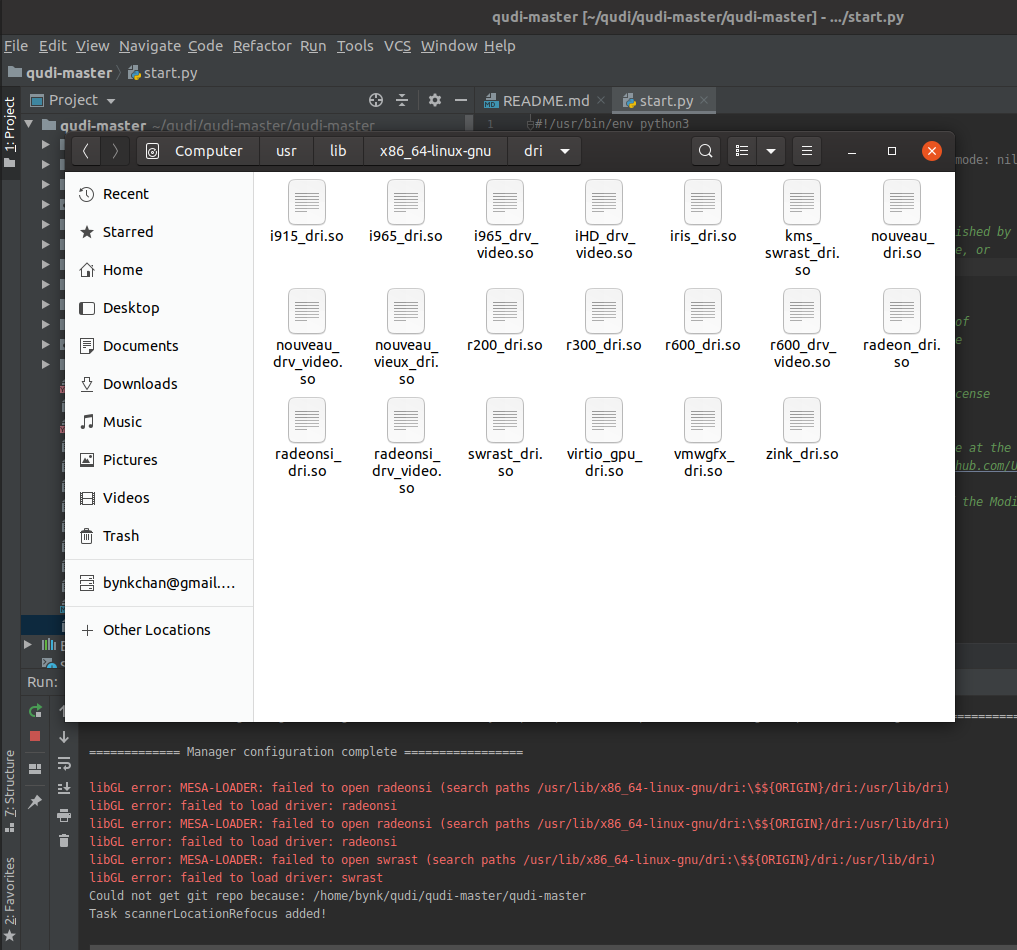
Hi, I'm on Ubuntu 19.10, using PyCharm 2020.1 . I am trying to run the start script of a program called qudi. When I do, I get the following errors:
libGL error: MESA-LOADER: failed to open radeonsi (search paths /usr/lib/x86_64-linux-gnu/dri:\$${ORIGIN}/dri:/usr/lib/dri)
libGL error: failed to load driver: radeonsi
libGL error: MESA-LOADER: failed to open radeonsi (search paths /usr/lib/x86_64-linux-gnu/dri:\$${ORIGIN}/dri:/usr/lib/dri)
libGL error: failed to load driver: radeonsi
libGL error: MESA-LOADER: failed to open swrast (search paths /usr/lib/x86_64-linux-gnu/dri:\$${ORIGIN}/dri:/usr/lib/dri)
libGL error: failed to load driver: swrast
I followed the path to the directory and found the required files, so I don't know why they won't load. Can anyone help? Images are attached for reference. Thanks!
Please sign in to leave a comment.
Hi,
Just to isolate the issue to IDE - are you able to run your code from the terminal, outside of IDE?