Removing 'import' items from intent/context menu

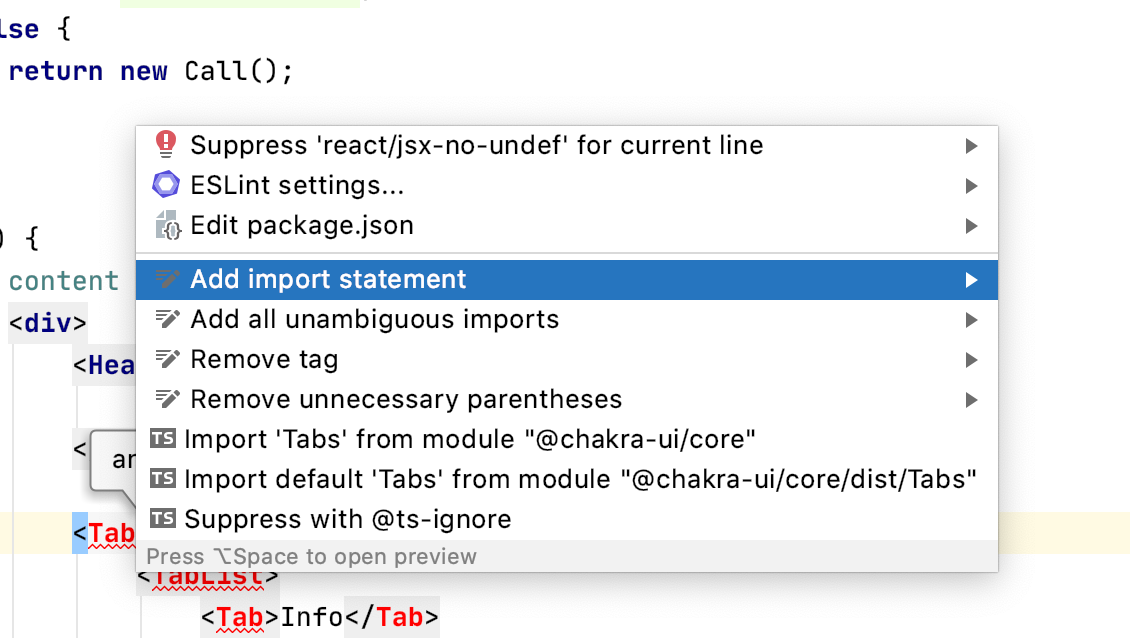
Hello, I am using Typescript and React. When I import a new component, Webstorm gives me the option to 'Add import statement' or \Add 'Tag' to existing import declaration....'
Why does it list both options, can I disable one of these? Also, how can I disable the top three options (suppress..., ESLint settings... and edit package.json?)
Also, both Import and the TS Import (the lower one) offer up two options to import from. Is there a way I can remove the `dist` folder from the suggested imports?
WebStorm 2020.1.1
Build #WS-201.7223.93, built on April 30, 2020
Please sign in to leave a comment.
No, this menu is not customizable.
You can add `@chakra-ui/core/dist` to Do not import exactly from list in Settings | Editor | Code Style | TypeScript | Imports - this should remove dist from Add import statement popup. Note that the fixes that come from tsserver (the ones marked with TS) can't be customized