Porting DevKit plugin to Gradle
Answered

Hello!
So I'm trying to convert https://github.com/reedy/phpstorm-plugin-mediawiki from a DevKit plugin to a Gradle one... Nothing pushed to GitHub
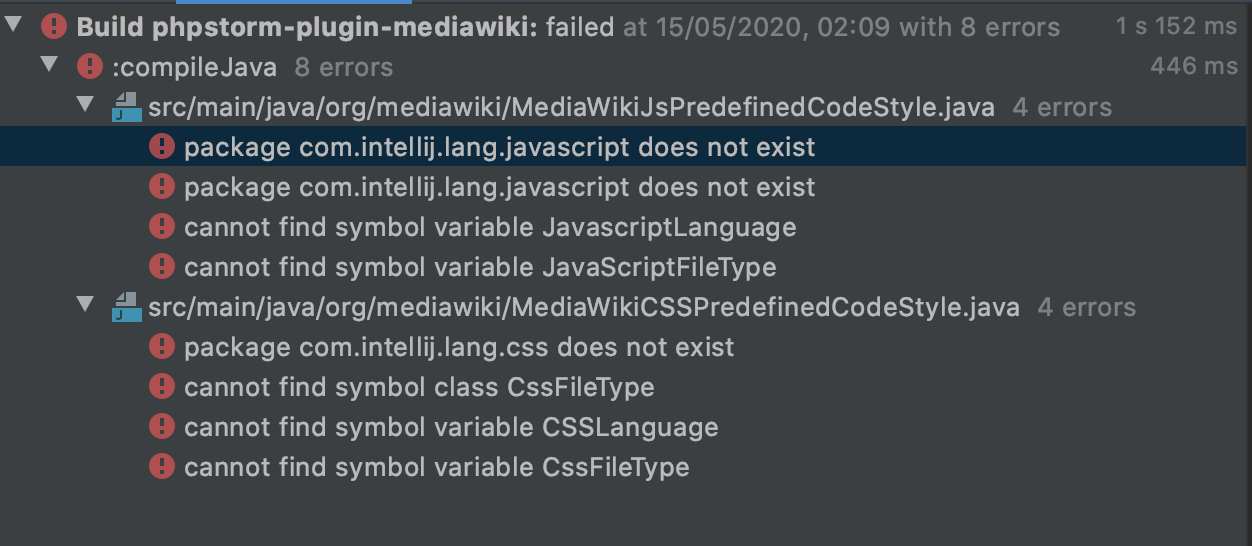
I'm struggling to work out what I need to put into `build.gradle` to get the references to CSS and JavaScript to work..
I'm presuming I need `com.intellij.lang.javascript` and `com.intellij.lang.css`... But I can't find anything that works with the version numbers, but "com.jetbrains.php:201.7223.91" for PHP works fine
Thanks!
Please sign in to leave a comment.
Sam, your presumption is correct but looks like something is misconfigured.
Please provide the dependencies that you've set both in plugin.xml and Gradle configuration.
plugin.xml is still the same as it was (just in a new location) - https://github.com/reedy/phpstorm-plugin-mediawiki/blob/master/META-INF/plugin.xml#L58
Adding in
Seems to help... As it now only gives
But in the Javascript code style file, there are still unresolved symbols...
Build.gradle:
plugins {
    id 'java'
    id 'org.jetbrains.intellij' version '0.4.21'
}

group 'org.mediawiki'
version '0.5'

repositories {
    mavenCentral()
}

dependencies {
    testCompile group: 'junit', name: 'junit', version: '4.12'
}

// See https://github.com/JetBrains/gradle-intellij-plugin/
intellij {
    version '2020.1.1'

    plugins = [
            "com.intellij.lang.css:201.7223.91",
            "com.intellij.lang.javascript:201.7223.91",
            "com.jetbrains.php:201.7223.91",
    ]
}
patchPluginXml {
    changeNotes """
      Add change notes here.<br>
      <em>most HTML tags may be used</em>"""
}
You must not specify version of intellij.plugins when referring to bundled plugins, this will not resolve properly and/or eventually mismatch with `intellij.version`
https://github.com/JetBrains/gradle-intellij-plugin#configuration
Ok... So if we remove the versions...
> Required plugins weren't loaded
Click "Install required plugins" get an empty window... Which is ever so helpful and pointless
Please specify "type='IU'" in intellij-block. By default, it targets Community Edition so that would not work.
What/where is `intellij-block`?
I'm presuming you mean the `intellij {}` section of the gradle file?
Adding that makes no difference
>Cannot find builtin plugin CSS for IDE: /Users/reedy/.gradle/caches/modules-2/files-2.1/com.jetbrains.intellij.idea/ideaIC/2020.1.1/640aff4c23a001e5595ee654670d774e9efcd118/ideaIC-2020.1.1
Yes, the intellij {} section.
It is still using IC-version as can be seen from the path:
/Users/reedy/.gradle/caches/modules-2/files-2.1/com.jetbrains.intellij.idea/ideaIC/2020.1.1/
Great. But if I add what you tell me, and then try to rebuild the project... And it doesn't change the paths. That's hardly my fault
Restarting the IDE seems to have made some difference
It's downloading ideaIU-2020.1.1.zip now...
But we have the same error still, just with a slightly different path
> Cannot find builtin plugin com.intellij.lang.CSS for IDE: /Users/reedy/.gradle/caches/modules-2/files-2.1/com.jetbrains.intellij.idea/ideaIU/2020.1.1/b0ed78dac3999fcbf78ac403fcf005490ea9b5a3/ideaIU-2020.1.1
The plugin ID for CSS to specify is "com.intellij.css" where did you find "com.intellij.lang.CSS" ? It's "JavaScript" for JavaScript plugin