WebStorm 2020.1.1 - Disable Undo / Redo confirmation dialogues

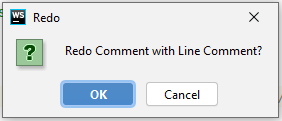
I have a webstorm install with default plugins, and working on a TS project, I keep getting random undo / redo confirmations, how can I disable these? I searched all over and forums say its a bug or possible plugin problem, but I have not installed any extra stuff.
Please sign in to leave a comment.
Typically the IDE does not ask to confirm undo/redo actions on typing, adding comments, etc. And for me it does not, so I cannot reproduce the problem at the moment.
This may occur if typing triggers some additional action(s) that require confirmation. For example, undo adding a comment may cause confirmation if a file is added to some diagram (https://youtrack.jetbrains.com/issue/IDEA-178610). It can also be caused by custom plugins
I'd suggest the following:
- disable all custom plugins, make sure that no external tools are watching and modifying your files (trying to modify the file concurrently can cause issues like this)
- if the issue persist, try to find a sequence of actions that lead to it