WebStorms File-Tab not opening

I restarted my PC and since then, WebStoms says:
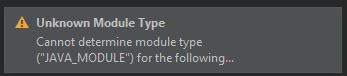
I cannot access the File-Menu:

And cannot open any Files in WebStroms.
It was installed today and is the newest version afaik.
Please help me, it's urgent.
Regards, Thomas
Please sign in to leave a comment.
After opening a File via the File-Browser, I can open Files now, but I still does not load the files in the source-folder
Most probably your project configuration files (in
.ideafolder) are damaged (as a result of system crash or any other kind of improper termination, etc.) Sharing the project files between different IDEs can also be the issue - as far as I can see from the first screenshot, your project was created in IDEA Ultimate.Idea-based IDEs (PHPStorm, WebStorm, PyCharm, IDEA, etc) have the same project format (
.idea) but different settings/module types that aren't always compatible; in particular, IDEA Java projects have"JAVA_MODULE"type, whereas in WebStorm all projects are of"WEB_MODULE"type, WebStorm has no providers to handle Java modules. As a result, you see errors about unknown module type when opening your project in different IDE.If you like to work on the same sources in different IDEs, I'd suggest sharing the sources folder(s) but keeping the
.ideafolders separated: just create a new empty WebStorm project in preferred WebStorm-specific location and add your shared sources root as additional content root to it in Settings | Directories, Add Content root. As a result, you will have IDE-specific.ideafolders and shared sourcesI have already tried to remove the .idea-Folder and the template.iml file, but it didn't lead to a success.
What do you mean with Settings | Directories, Add Content root? There is no Settings-Tab in the Headder, where File, Edit and View are
Regards Thomas
It's File > Settings
If deleting
.ideafiles and re-opening the project folder in Webstorm with File > Open doesn't help, please share your idea.log (Help > Show Log in Explorer)As I said, I cannot open the File-Tab (all others work), therefore I cannot try this.
Here you can find the Log:
https://drive.google.com/file/d/1fEoxGsxgE6M3gH-9Dq4scBkVTGyj7q4x/view?usp=sharing
I'm not permitted to access it unfortunately:( Could you grant me permissions, please?
You should now have it
Thanks.
Your installation seems to be broken because of java.lang.NoClassDefFoundError: Could not initialize class uk.co.reecedunn.intellij.plugin.intellij.fileTypes.XQueryFileType errors
Please disable both XQuery Support + MarkLogic Debugger and xquery-intellij-plugin plugins, invalidate caches (File > Invalidate caches) and restart
How can I disable them, when I cannot open File?
Try hitting Ctrl+Alt+S to open Settings, or hit Shift+Shift and type "Settings":
if nothing works, shut down the IDE and then remove both C:\Users\thost\AppData\Local\JetBrains\WebStorm2020.1 and C:\Users\thost\AppData\Roaming\JetBrains\WebStorm2020.1\plugins folders
The shortcuts did not work, but removing the folders fixed it.
Thank you vermy much for your time and help.
I wish you a wonderful day.
Regards, Thomas Stoiber