Unable to run maven goal from under Idea 2020.1.2

I've been going crazy for the last two days, unable to run maven from IDEA. When I try to run maven task from under Idea to compile, instal or even clean a project the task always fails with mrssage :
"Process terminated".
The attempt to run it from command line also constantly successful.
idea.log contains this lines:
2020-06-25 18:03:30,083 [13153412] WARN - ach.JavaAttachDebuggerProvider - Remote thread failed for unknown reason (-1073741819)
java.lang.InternalError: Remote thread failed for unknown reason (-1073741819)
at jdk.attach/sun.tools.attach.VirtualMachineImpl.enqueue(Native Method)
at jdk.attach/sun.tools.attach.VirtualMachineImpl.<init>(VirtualMachineImpl.java:62)
at jdk.attach/sun.tools.attach.AttachProviderImpl.attachVirtualMachine(AttachProviderImpl.java:69)
at jdk.attach/com.sun.tools.attach.VirtualMachine.attach(VirtualMachine.java:207)
at com.intellij.debugger.impl.attach.JavaDebuggerAttachUtil.attachVirtualMachine(JavaDebuggerAttachUtil.java:45)
at com.intellij.debugger.impl.attach.JavaAttachDebuggerProvider.getProcessAttachInfoInt(JavaAttachDebuggerProvider.java:231)
at com.intellij.debugger.impl.attach.JavaAttachDebuggerProvider.lambda$getProcessAttachInfo$1(JavaAttachDebuggerProvider.java:207)
at com.intellij.openapi.application.impl.ApplicationImpl$1.call(ApplicationImpl.java:255)
at java.base/java.util.concurrent.FutureTask.run(FutureTask.java:264)
at java.base/java.util.concurrent.ThreadPoolExecutor.runWorker(ThreadPoolExecutor.java:1128)
at java.base/java.util.concurrent.ThreadPoolExecutor$Worker.run(ThreadPoolExecutor.java:628)
at java.base/java.lang.Thread.run(Thread.java:834)
Any idea on how to narrow down what the problem is?
My OS is Windows10.


Please sign in to leave a comment.
got the same problem
The problem for me remains unresolved.
Reinstallation does not help.
The trial period will soon end, but I was going to buy what I do not even know about now ...
Sorry for the late response, IntelliJ IDEA support team didn't get a notification about this ticket because it was submitted in the wrong forum.
The issue you have could be caused by a third-party antivirus/firewall killing the processes launched from IntelliJ IDEA. Please check the windows event viewer for anything related: https://www.howtogeek.com/123646/htg-explains-what-the-windows-event-viewer-is-and-how-you-can-use-it/ . Whitelisting IntelliJ IDEA and Java processes may help.
We recommend using using the support form at https://intellij-support.jetbrains.com/hc/requests/new to get the priority support (guaranteed response within a working day).
> The trial period will soon end, but I was going to buy what I do not even know about now ...
Please contact sales at https://www.jetbrains.com/support/sales/ for the trial extension and link this comment.
Same problem here, running win 7 though.
Wlamers
Did you try disabling the antivirus?
>Did you try disabling the antivirus?
Yes, I turned off the Firewall entirely and it didn't help.
The problem hasn't been solved. The trial period is over, but now I have a key and I need to do something about it.
In the system log, this is: (Is it really a problem with java.exe? Why, then, does it work from the command line?)
Try using a more recent Java build. If it doesn't help, please upload the crash dump files at https://uploads.jetbrains.com. You can find them at C:\Users\<user>\AppData\Local\CrashDumps\.
In the end, the following helped: enable "developer mode" in the "Windows Update Center" section (Oh, this mysterious Windows!)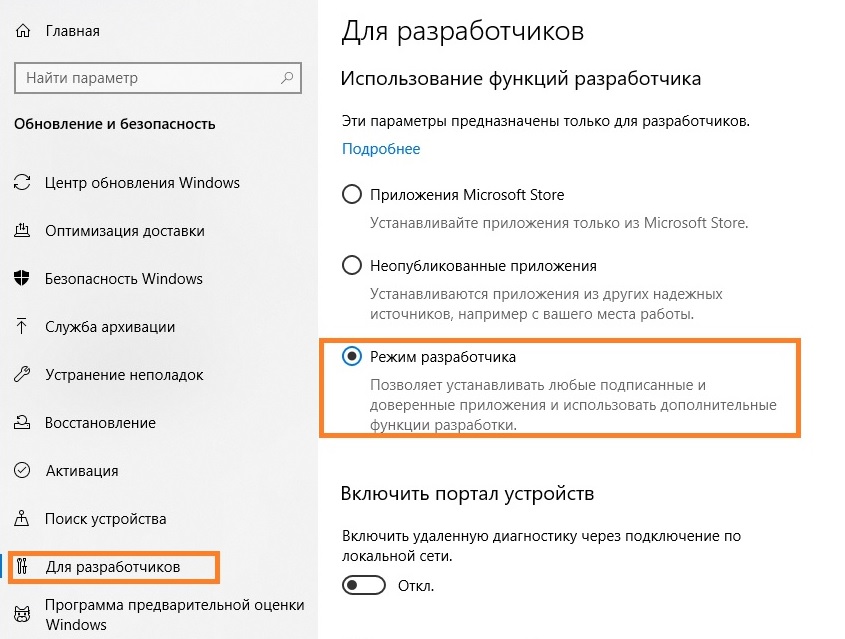
any of methods mentioned above didn't help
I use windows 10, intellij idea community edition 2021.1
I'm working on spring application
I am using jdks\corretto-1.8.0_292, I need to use this jdk
guys i solved this problem by deleting punto swticher programm
I'm running IDEA 2021.2 EAP (Ultimate Edition) on Ubuntu and getting the same "Process Terminated" when running even just the Maven clean goal.
IntelliJ IDEA 2021.2 EAP (Ultimate Edition)
Build #IU-212.3724.25, built on June 4, 2021
IntelliJ IDEA EAP User
Expiration date: July 4, 2021
Runtime version: 11.0.11+9-b1481.1 amd64
VM: OpenJDK 64-Bit Server VM by JetBrains s.r.o.
Linux 5.4.0-73-generic
GC: G1 Young Generation, G1 Old Generation
Memory: 750M
Cores: 8
Registry: debugger.watches.in.variables=false
Non-Bundled Plugins: IdeaVIM (0.67), com.alayouni.ansiHighlight (1.2.4), com.intellij.ideolog (203.0.27.0), com.euphoricity.gitignore (0.3), org.jetbrains.plugins.hocon (2020.1.0), org.intellij.scala (2021.2.9)
Kotlin: 212-1.4.32-release-IJ3724.25
Current Desktop: ubuntu:GNOME
Never mind - Maven log shows it was an illegal character in the artifact id. Pilot error - nothing to see here.
Try disable user settings file override checkbox. it helped me.
I am running on mac. the same issue exactly minutes after updating my intellij happened to me. I blame the update
Tohidfla your issue is likely different, please report at https://youtrack.jetbrains.com/newIssue?project=IDEA with the logs attached via Help | Collect Logs and Diagnostic Data and other details.
If you run mvn command in terminal instead of intellj, you will get the error there
Thank you Serge Baranov ,
Turned out that my problem was related to global maven setting. bye correcting and overriding settings.xml in `.m2` folder (user home directory) it got soled. (The detail is for next person who lands here :) )