Django + Jinja2 autocomplete

Hello everyone,
I'm using Django with Jinja2 template and the auto-complete doesn't work,
Python version: 3.8.5
Django version: 3.1.1
using Docker/docker-compose
Django support was enable, Jinja2 designed as Template language in pycharm settings. The app directory was marked as source folder and jinja2 directory as template folder on pycharm.
Auto-complete works fine in .py files but in templates I have no auto-complete or the minimum ...
My templates variable in app/settings.py
TEMPLATES = [
    {
        'BACKEND': 'django.template.backends.jinja2.Jinja2',
        'DIRS': [BASE_DIR.joinpath("jinja2")],
        'APP_DIRS': True,
        'OPTIONS': {
            'environment': 'app.jinja2.environment'
        }
    },
    {
        'BACKEND': 'django.template.backends.django.DjangoTemplates',
        'DIRS': [BASE_DIR.joinpath("templates")],
        'APP_DIRS': True,
        'OPTIONS': {
            'context_processors': [
                'django.template.context_processors.debug',
                'django.template.context_processors.request',
                'django.contrib.auth.context_processors.auth',
                'django.contrib.messages.context_processors.messages',
            ],
        },
    },

]
My app/jinja2.py environment (like Django doc suggest)
from django.templatetags.static import static
from django.urls import reverse

from jinja2 import Environment


def environment(**options):
    env = Environment(**options)
    env.globals.update({
        "static": static,
        "url": reverse,
    })
    return env
Screenshot's example when i press ctrl + space
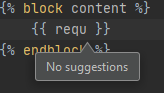

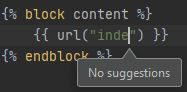
I don't know if I did something wrong or if it is a bug, but I have the feeling that no reference works (django automatically inject request) and no reference that I inject into the environment either.
https://docs.djangoproject.com/en/3.1/topics/templates/#django.template.backends.jinja2.Jinja2
PS: I tried file/Invalidate Cache... But no effect.
Cheer :).
Please sign in to leave a comment.
Hi, I had similar problem. Please go to Preferences --> Languages & Frameworks --> Django and check if there is settings.py file attached in 'Settings' attribute:
Possibly a known issue https://youtrack.jetbrains.com/issue/PY-45753
Please try the workaround as described by Konrad.