Documentation tooltip appears over autocomplete tooltip
Answered

Hi all.
So this is my problem:
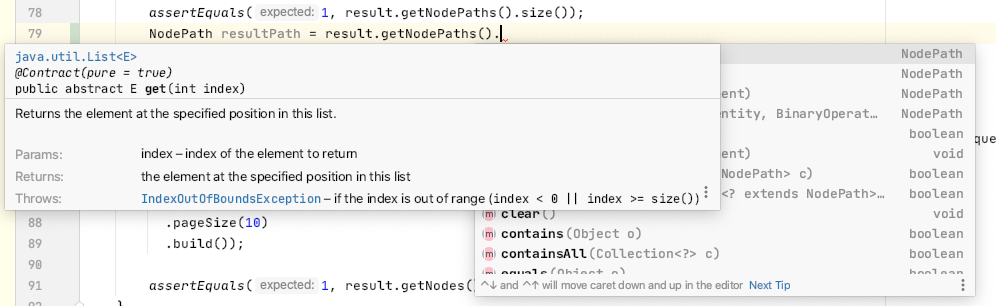
I would like to keep both features but not one over the other 😅
Please sign in to leave a comment.
Hello,
Please share idea.log ("Help | Show Log in...") after restarting IDE.
Hi, thanks for the response.
I check the logs and they have some full path file names I'm not comfortable sharing, sorry. I didn't see any message related to this anyway.
So I played a little with the window size and it's showing right now, seems that the "issue" is related to: window size + monitor space
Could you please share only first lines from startup log with general OS information and IDE configuration?
We have several issues when window size might cause such collisions.
Ok great, here is the startup piece of the logs:
Let me know if I can give you more info.
Did you change Documentation popup size? Do you use presentation/full screen mode?
No, I didn't change any settings really. Only installed some plugins like Scala and Lombok.
Could you please describe your hardware and monitor settings? I couldn't reproduce the issue on my side.
Sure, this is my machine:
And this is the external monitor:
Here is another example of a misplaced doc tooltip, it's not that bad but looks weird. The screenshot is full size so you can take measurements:
Thanks for the information! Could you please provide one more test - install 2020.3 EAP (https://www.jetbrains.com/idea/nextversion/), restore default settings ("File | Manage IDE settings") and check if the issue still occurs?
I can confirm that the same issue happens on WebStorm 2021.3.2.
@...
I could not reproduce that.
May you share your environment's details? Monitors size, editor's dimensions, OS and screenshot of the whole IDE window.