IntelliJ refuses to acknowledge excluded folders in an SDK project

Hi, I have a very frustrating problem, but posting here before YouTrack because I can't figure out reliable reproduction steps, or whether it may be my fault somehow.
I have this branch https://github.com/chylex/AceJump/tree/humongous-refactor of an IntelliJ plugin project checked out, and have for a while. This branch has the following build.gradle statement, because I kept having constant issues with the `build` folder appearing in project files, and IntelliJ kept indexing like 200 MB of crap and showing it in search results...
idea {
  module {
    excludeDirs.add(buildDir)
  }
}
Yet for some reason it just doesn't work. Every time I restart IntelliJ, the folder is back, and reloading the Gradle project in an attempt to make the excludeDirs clause do anything at all doesn't work...
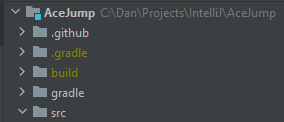
The only thing that kind of work is right-clicking the build folder and manually marking it as Excluded... until you restart IntelliJ and it reappears again...
But the stranger thing is that when I tried checking out the project from scratch into a different folder, the build folder never appeared in the project in the first place, even on a branch that doesn't have the build.gradle clause:
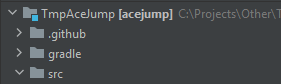
and I cannot figure out what made the build folder appear here in the first place. Tried the command | buildPlugin, runIde, test | switching branches, the usual things I do in the project, and in the new workspace I simply cannot reproduce the error that currently still keeps happening in the old workspace, on multiple computers meaning that something I normally do in the project in IntelliJ must've caused this on multiple occasions.
Does anyone have an idea what could be happening with the workspace that makes excluding the build folder impossible?
Please sign in to leave a comment.
Build directory appear on the file system after building the project. This directory is excluded by default unless it explicitly configured not to. Note that there is Show Excluded Files option in Project tool window - when disabled the excluded directories are not shown.
>Does anyone have an idea what could be happening with the workspace that makes excluding the build folder impossible?
Could you attach screenshot of Gradle Settings (Preferences on macOS) | Build, Execution, Deployment | Build Tools | Gradle settings for this project?
Thank you. Still can not reproduce. Could you upload complete project with IDE project configuration files at https://uploads.services.jetbrains.com to check? Thanks.
It looks like the project + configuration are not enough, I setup a second installation to make sure it happens there, but it only happens if I copy the 2 GB folder from %LOCALAPPDATA%\JetBrains over to the second installation. I will try to delete folders until it stops happening, because I cannot easily upload a 2 GB archive. Obviously the folders differ between computers, so the fact it is happening on multiple computers means there must be something that reliably "corrupts" the local installation.
I narrowed it down to "external_build_system" and "index" folders, something inside them is preventing the exclusion of .gradle and build folders, and reloading the Gradle project does nothing. However I am unable to upload the archive because of constant errors:
Thank you for updates. It may be some inconsistent state of the project configuration. The external_build_system directory saves the configuration for Gradle/Maven based projects which is generated automatically (on project re-import). You may try to enable the Settings (Preferences on macOS) | Build, Execution, Deployment | Build Tools | Gradle | Generate *.iml files for modules imported from Gradle to disable external storage for the project and refresh or re-import project (File | New | Project from Existing Sources). Or it could even help to just relocate the project to any other directory.
Should I still upload the files so you can check what's wrong in the project model or indexes, and maybe try to figure out what caused it in the first place? If so, can you check why the upload website isn't working for me?
If I will not be able to reproduce the problem locally (and if it depends on external_build_system directory contents - it will not be possible to reuse this contents if open project by another directory - same machine or a new one, the same is for index) there are little changes problem could be tracked down.
I'll ask our engineers to check the upload server errors.
Turning on Generate *.iml files for modules imported from Gradle and reimporting the project works by the way (so does deleting the two folders, but I don't trust it to not happen again with external project files).
If it happens again please try to spot after what actions does it happen. Please also upload IDE logs directory and project together with configuration files.
If error occurs again something corrupts the response from the server, could be a browser extension or firewall. You could try it with different browser. If still fails it would be helpful to get the HAR file for the investigation and the browser information.
I don't think this would've helped, but for some reason in the idea gradle plugin `excludeDirs.add` just doesn't work...only `excludeDirs += file(...)` does...so the attempt at excluding via gradle wasn't doing anything anyway.