Line comment shifts code 2 spaces to the right (when using first column //)
Answered

I want code that is commented out with line comments to retain its position. I have this set on one computer, but I cannot find the setting anymore so I can set it on other instances of IDEA (currently running 2019 on both computers):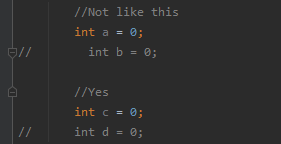
Please sign in to leave a comment.
It is needed to use smart tabs for that:
I did notice that I did not have that turned on initially, but checking them did not fix it for me. These are my settings in IDEA code style xml format:
May you try with a new file?
Most probably, spaces were not converted into tabs in existing source code.
I did have to create a new file to see the change.
To apply that to existing files:
In IntelliJ IDEA, to convert existing tabs to spaces or vice versa, use File → Edit → Convert Indents → To Spaces (or To Tabs). The Reformat code shortcut Ctrl+ Alt+ L will also do this, while applying other changes.
From https://stackoverflow.com/a/64037470/8203759