Wrong keyboard layout used by shortcuts
Answered

I use IntelliJ on a new AZERTY (french layout) MacBook Pro, and the layout is correctly used when I type in the editor.
I used synchronization to get my setting that was both used on Windows and macOS.
Unfortunately, this layout is not used for shortcuts ...
When I type "⌘," (where the M is in a QWERTY layout), it triggers "⌘M" (minimize) and "⌘," (open Settings) at the same time.
On the "Find Shortcut" filter field of "Keymap" preference panel, when I type "," or "M", it displays an "M"
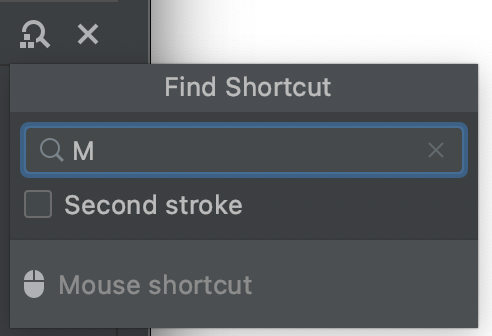
This is really weird because when I type an A (where a Q is on a QWERTY layout), it displays "A".
The layout used for shortcut seems to be a mix between a Windows AZERTY and a QWERTY.
Please sign in to leave a comment.
Hello, please clarify a bit more details:
- How did you do the sync?
- Does it work fine in other applications? (especially in swing-based. e.g., NetBeans, JEdit)
- Provide a screenshot from `Settings/Preferences | Keymap`.
- Collect logs and diagnostic data. `Help | Collect Logs and Diagnostic Data`
The files can be uploaded at https://uploads.jetbrains.com. (do not forget to specify the UploadID)
- How did you do the sync?
With my Jetbrains account
- Does it work fine in other applications? (especially in swing-based. e.g., NetBeans, JEdit)
Same behavior with NetBeans
- Provide a screenshot from `Settings/Preferences | Keymap`.
- Collect logs and diagnostic data. `Help | Collect Logs and Diagnostic Data`
Upload ID : 2021_03_04_QTkGZz8MbQBxcCat
Egor Klepikov is it possible to have an update on this one ?
I'm supposed to prepare a workflow to learn to my coworkers how to use IntelliJ in a better way, it will be much easier if I can use my shortcuts :D
Hi!
Sorry for the delay. Are you on Apple Silicon Mac? There's a known issue: https://youtrack.jetbrains.com/issue/IDEA-260418
Yes, I'm on an Apple Silicon Mac (not with a Dvorak layout though), but this is probably this issue.
Thanks