Keyboard shortcut line comment pushes caret to beginning of next line without indenting

I'm already annoyed at the extra clicks coming from keyboard shortcut line commenting pushing the caret down to the next line (believe me, I tried to love it), but now I notice that if there's an empty line below the newly-commented line, the caret starts at the beginning of the line instead of the beginning of the indented text column, unlike hitting Enter on the keyboard would...
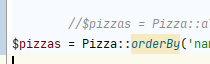
Typing out a new code line doesn't trigger in any way the formatter... even after hitting Enter. It's just all mashed to the left like some lost lamb, and without manual reformatting (tab tab tab or space space space space space space etc or up Enter up etc) it junks up the code...
New features shouldn't add keystrokes to my work... if you're gonna force me to have the caret go down to the next line with keyboard shortcut commenting, at least understand that when I start typing code, it should be indented, or at the very least indent it properly after I hit Enter after I've typed out the line.
Please sign in to leave a comment.
Unfortunately, there is no way to disable caret move on "line comment" action:
https://youtrack.jetbrains.com/issue/IDEA-119435
However, at least two workarounds are available:
- To make a selection first (even one symbol should be enough), it will keep the caret intact;
- Record a macro, f.e.:
https://stackoverflow.com/questions/27532129/intellij-disable-cursor-moving-after-commenting-a-line-with-a-shortcut/27545802#27545802