How to validate JS/TS project completely
Answered

Hi,
maybe I'm missing something, but I can't figure out how to force a complete check on the whole JS/TS project. The check seems to performed on file basis only once it is opened - only then I see it gets underlined in ("underwave") red in the project view (tree) on the left.
Before opening capture.ts
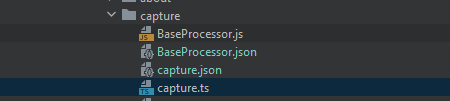
After opening capture.ts:

Running tsc (through gradle) on the project does discover all the things at once, but the error results there are not hyperlinked (this would be my issue #2 I guess)
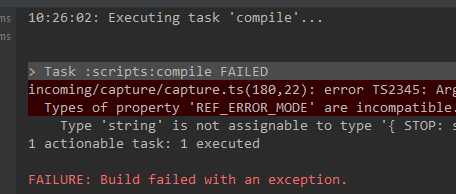
Anybody any ideas, please? Are these not supported or is it misconfigured on my end?
Thanks a lot, Best regards,
A.
Please sign in to leave a comment.
Hi Ales,
You can run Analyze | Inspect Code... from the main menu and select the whole project as your scope:
Then you will see all errors in the Inspection Results tool window:
Hi Arina Efremova,
thanks for response. I have tried this. It opens Inspection Results tool window/panel with all the results, but the error is not there and the file doesn't get underlined in the Project tree. Again, only when I click to it (only tsc compile discovers it).
This is a JS library, where I rename function and would want to see an error discovered across the code:

->
the file using it is still not underlined:
if I go doubleclick the file, it does:
inside:
It seems to be specific to JS/TS, in Java projects it's OK for me.
Thanks,
A.
Is it a compiler error (prefixed with TS)? These errors are not shown in Inspection Results, but you can see them in the Problems tool window. If you switch to the Project Files tab, you will see errors from all project files:
Yes, compiler errors (TS*). I can confirm they are appearing there (Problems). Almost instantly, even on depending objects.
Now only if there was a chance to visualise (red underline) these Project Errors immediately on the individual files in the Project Tree, without opening them, one by one?
Thanks
No way currently; related feature request: https://youtrack.jetbrains.com/issue/IDEA-262523
I see, OK, thank you for your support