WebStorm : Latest package version not found

Using webstorm for the project and have to rely on the VSCode for finding the latest package version number (I know, there are npm and yarn commands)
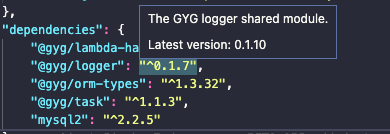
so what's the issue that, VSCode is able to show the latest package number, while WebStorm stuck on loading... and after cmd+click, shows latest not found.
images attached for the reference
WebStorm
VSCode

Please sign in to leave a comment.
Log file: https://drive.google.com/file/d/1QGdhmyv0mFBcQfEWw3Cn_A2PRapy18en/view?usp=sharing

IDE: WebStorm 2020.3.2
Build #WS-203.7148.54, built on January 25, 2021
Runtime version: 11.0.9.1+11-b1145.77 x86_64
VM: OpenJDK 64-Bit Server VM by JetBrains s.r.o.
macOS 10.16
GC: ParNew, ConcurrentMarkSweep
Memory: 1981M
Cores: 8
Registry: ide.balloon.shadow.size=0
Non-Bundled Plugins: com.chrisrm.idea.MaterialThemeUI, com.mallowigi, de.ax.powermode, some.awesome, aws.toolkit, com.codota.csp.intellij, izhangzhihao.rainbow.brackets
The log shows that the packages were not found in NPM registry (registry.npmjs.org); are
@gyg/*packages private?Yes.. They are private repo hosted in aws codeartifact... But i wonder how VSCode able to retrieve the version number while WebStorm couldn't...
only official NPM Registry is currently supported; we are investigating a possibility to fetch info about private packages or packages from custom repositories. Related youtrack tickets: https://youtrack.jetbrains.com/issue/WEB-36709, https://youtrack.jetbrains.com/issue/WEB-42189
Understood. Thanks for information