PyCharm Intellisense not Working for Subordinate Objects of Passed in Parameter in discord.py

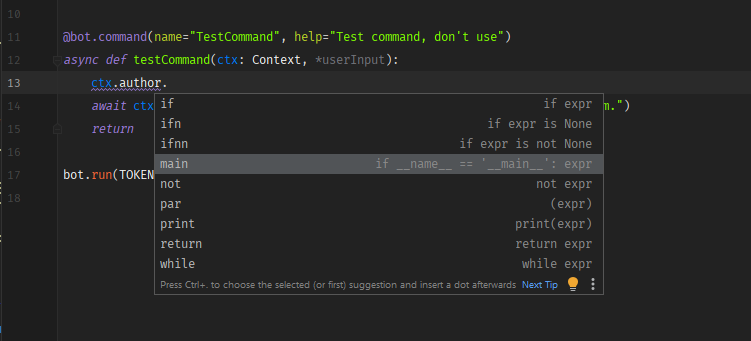
So what I am trying to have happen is for intellisense to display as properly for all subordinate objects as I drill down deeper into a passed parameter, `ctx`. This works when drilling into the passed in parameter `ctx` because I've specified it's type in the function definition; however, when trying to drill into `ctx.author` I lose all intellisense.
Things I've tried thus far:
1. Ensuring that the interpreter can see the installed libraries in the project structure. I've also tried marking everything as sources, though it doesn't make a difference.
2. Invalidate Caches / Restart. No luck here unfortunately.
3. Confirmed that my code completion are not prohibiting me somehow.
4. The hot keys ctrl+space, ctrl+double-space, and ctrl+shift+space do not trigger it.
I've included a minimum working example below as well as some screenshots under. I would really appreciate another set of eyes taking a look at this and see what I might be missing, or pointing me in the correct direction.
```Python
from discord.ext import commands
from discord.ext.commands.context import Contextfrom dotenv import load_dotenv
import osload_dotenv()
TOKEN = os.getenv("DISCORD_TOKEN")
bot = commands.Bot(command_prefix=commands.when_mentioned_or("!"))
@bot.command(name="testCommand", help="Test command, don't use")
async def testCommand(ctx: Context, *userInput):
await ctx.send("This has been a test of our intellisense system.")
returnbot.run(TOKEN)
```



Please sign in to leave a comment.
Hi,
It seems those methods are too dynamic for our static code analysis. The return type of, for example, author method is unknown to PyCharm (Any) and that's why it doesn't show better results.
It worth submitting a feature request to our issue tracker requesting proper support for this https://youtrack.jetbrains.com/issues/PY
Thanks so much for your reply. I really appreciate it.