Prevent JetBrains IDEs from writing to `AppData/Roaming/JetBrains` and Registry in "portable" mode

I'm using IDEA and CLion with custom `idea.properties`, which allows me to use both IDEs portably over different OS installations and computers. However, it seems all JetBrains IDEs write to 2 non-portable locations, and I can't seem to figure out how to make them write somewhere else:
1) AppData: `C:\Users\<name>\AppData\Roaming\JetBrains`
These seem to be some kind of cross-IDE installation IDs and prompt consents.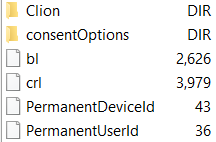
2) Registry: `HKCU/SOFTWARE/JavaSoft/Prefs/jetbrains`
This seems to be written by the Java `Preferences` API, which uses Registry on Windows. Only a handful of settings seems to be stored here.
I'd prefer if these would be unified into a single filesystem directory, which could be overridden in `idea.properties`, but a path in an environment variable is also OK.
Please sign in to leave a comment.
Consent options are using the common data path for the OS, see https://github.com/JetBrains/intellij-community/blob/master/platform/platform-impl/src/com/intellij/ide/gdpr/ConsentOptions.java for the implementation details.
The only way to override this location is by changing the user.home JVM option passed to IntelliJ IDEA.
Registry location is controlled by the following JVM options: java.util.prefs.systemRoot, java.util.prefs.userRoot. There is no easy way to store it in a file on Windows. A hard way would be implementing your own preferences and bootstrapping it into IntelliJ IDEA somehow: https://stackoverflow.com/questions/208231/is-there-a-way-to-use-java-util-preferences-under-windows-without-it-using-the-r/208289#208289.