Can not edit commit message after squash
Answered

Hi all,
I am trying to squash a couple of commits. That works just fine. I am using the latest IntelliJ Ultimate version.
When i select the squashed commit, i want to enter a new commit message.
As stated i use F2 or select edit commit message from the menu.
However, i get the following popup:
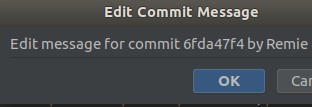
I can only choose OK and cancel. Nowhere i can modify my commit message.
Kind regards,
Remie
Please sign in to leave a comment.
Please try File | Invalidate Caches | Invalidate and Restart.
Probably, the dialog is just incorrectly resized so that editor field is not visible. That will be fixed in 2021.1.1
See https://youtrack.jetbrains.com/issue/IDEA-262598 for the details
Hi Konstantin,
I tried it already (invalidate caches), but it does not work for me.
Clearly the window size is incorrect.
Try checking "Clear file system cache and Local History"
Users report it helps: https://youtrack.jetbrains.com/issue/IDEA-266681#focus=Comments-27-4834396.0-0
Thanks for the suggestion.
I tried it and still no luck.
@... do I understand correctly that you cannot resize the dialog?
There is a ticket about such behavior and it will be fixed in the future release:
https://youtrack.jetbrains.com/issue/IDEA-262598
For now, you can resize the dialog and the editor field should become visible.
Hi Ruslan,
Thanks you very much!
I see that i can resize it manually, had not thought of that.
Kind regards,
Remie