How to send tasks to background with progressIndicator?
Answered

Hi, there are two questions for me, thanks for your reply.
1. I'm using a ConditionalModal Task like below, but when I pressed the 'Minimize' button, nothing happened and the UI was frozen until this task finished.
new Task.ConditionalModal(project, "Test Backgroundable", true, PerformInBackgroundOption.DEAF) {
    public void run(@NotNull ProgressIndicator progressIndicator) {
        progressIndicator.setIndeterminate(false);
        for (int i = 0; i < 10; i++) {
            progressIndicator.setText("Testing: " + i);
            progressIndicator.setFraction((i + 1) / 10d);
            try {
                Thread.sleep(1000);
            } catch (Exception e) {
            }
        }
    }
}.queue();
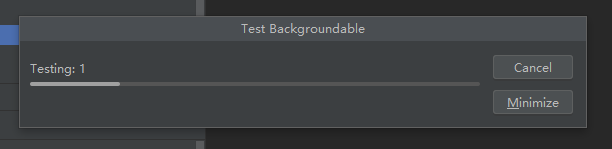
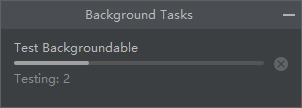
Please tell me how I could send task to background with progressIndicator (just like PerformInBackgroundOption.ALWAYS_BACKGROUND) when I pressed the Minimize button?
It should looks like below (when pressed the Minimize button):

2. I'm using 'Messages.showYesNoDialog' (or any other methods in Messages) to create a dialog, but it seems only the last dialog could remain if two or more dialogs were created. Is there any way to create more dialogs?
Please sign in to leave a comment.
1) seems https://youtrack.jetbrains.com/issue/IDEA-264030 is related
2) that's expected, as you should not create more than one modal dialog at once. what kind of multiple dialogs do you want to create?
Thank you so much!
As for the second question, for example: I created a input dialog, but if the user input the wrong word, I'd like to create another error dialog to remind user to re-input.
When the error dialog was created, the input dialog was expected to stay still.
Or, is there any other provided SDK to do this?
There's com.intellij.openapi.ui.Messages#showInputDialog(java.awt.Component, java.lang.String, java.lang.String, javax.swing.Icon) and variants for simple input dialogs including builtin validation. Alternatively build your own custom dialog https://plugins.jetbrains.com/docs/intellij/dialog-wrapper.html