Unable to install “IntelliJ IDEA CE”.
Answered

I am getting this error
The operation can’t be completed because you don’t have permission to access “IntelliJ IDEA CE”.
Please sign in to leave a comment.
Where do you get this error?
May you show a screenshot?
I am getting the same error. I can not install IntelliJ Ultimate (trial) intelliJ-ideaIU-2021.1.dmg
Mac OS X 11.2.3
java -version
openjdk version "16" 2021-03-16
OpenJDK Runtime Environment (build 16+36-2231)
OpenJDK 64-Bit Server VM (build 16+36-2231, mixed mode, sharing)
Get Info for /Applications/IntelliJ IDEA.app (while the below error dialog is displayed)
Error Dialog
Do you have an antivirus installed on your mac?
Try reinstalling IDE via ToolBox: https://www.jetbrains.com/toolbox-app/
I have tried the install via the Toolbox, same result.
Yes, I have Trend Micro Antivirus on my Mac
Please disable it, most probably it prevents IDE from start.
Trend Micro A/V disabled and still the same error. Note that I can install other apps without this error. I just installed Charles Proxy via .dmg file, no issues.
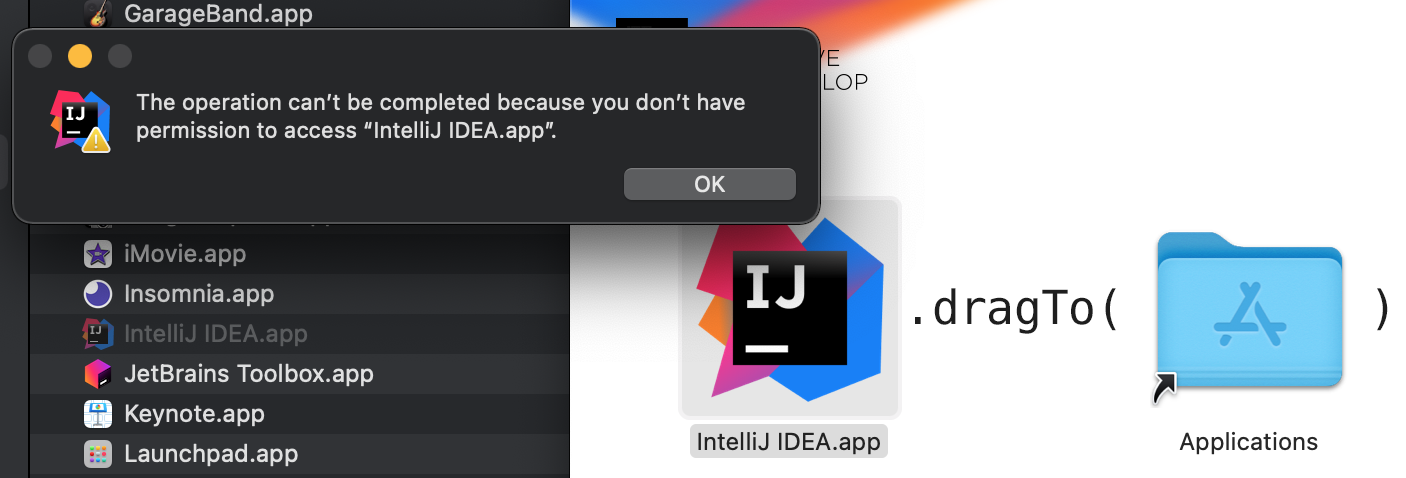
Also note I had previously installed IntelliJ but was having issues on start, so I uninstalled and now I am attempting to re-install.
Try to start the IDE from command line: https://intellij-support.jetbrains.com/hc/en-us/articles/360011901879-How-to-start-IDE-from-the-command-line
What is the output?
I can't even install the app, so I can't launch the IDE either
I did mount the .dmg from the command line and attempted to copy "IntelliJ IDEA.app" to /Applications. _Most_ of the files were copied but 12 were not, each failed copy statement had the error message "Operation not permitted"
I have Full Disk Access assigned to the Terminal.app
I finally got IntelliJ installed via Toolbox after shutting down Trend A/V with
sudo launchctl unload /Library/LaunchDaemons/com.trendmicro.* /Library/LaunchAgents/com.trendmicro.*
Thank you for your help!