Why is IntelliJ preventing me from changing the name of the project folder?

I have a fully functional project inside the "09-spring-boot-security-jdbctemplate-thymeleaf" folder.
I create the "10-spring-boot-security-jdbctemplate-thymeleaf" folder and copy the "src" and "pom.xml" resources into it.
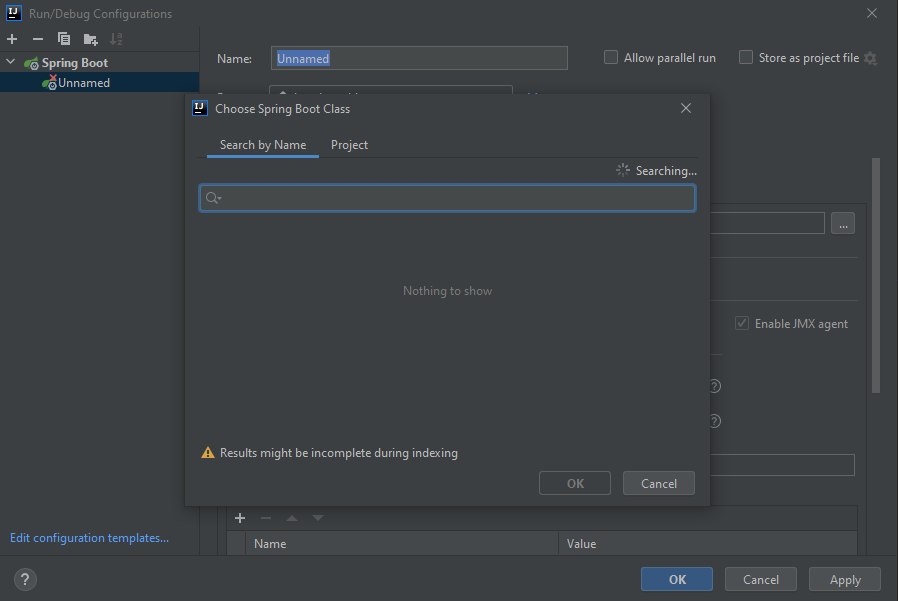
I open the IDE, set the Maven version, set the Java 1.8 version and then added a "Spring Boot" type project in "run".
Unfortunately IntelliJ won't let me choose the class containing the main () method.
I am unable to import "import org.springframework" into my project.
The word "springframework" is marked in red in all classes.
I have always followed this procedure. IntelliJ has always done its job but now it has stopped and I don't understand why.
I don't understand why IntelliJ doesn't suggest me the main () class of the project and doesn't even let me choose the one I want.
I have repeated the procedure that I usually perform dozens of times but IntelliJ just stopped working.
Why does this happen?
Thank you
IDE version: IntelliJ IDEA 2021.1

<?xml version="1.0" encoding="UTF-8"?>
<project xmlns="http://maven.apache.org/POM/4.0.0" xmlns:xsi="http://www.w3.org/2001/XMLSchema-instance"
	xsi:schemaLocation="http://maven.apache.org/POM/4.0.0 https://maven.apache.org/xsd/maven-4.0.0.xsd">
	<modelVersion>4.0.0</modelVersion>
	<parent>
		<groupId>org.springframework.boot</groupId>
		<artifactId>spring-boot-starter-parent</artifactId>
		<version>2.4.4</version>
		<relativePath/> <!-- lookup parent from repository -->
	</parent>
	<groupId>it.webapp</groupId>
	<artifactId>script</artifactId>
	<version>3.0</version>
	<packaging>war</packaging>
	<name>script</name>
	<description>WebApp con Spring Boot, Security, Thymeleaf e PostgreSQL</description>
	<properties>
		<project.build.sourceEncoding>UTF-8</project.build.sourceEncoding>
		<project.reporting.outputEncoding>UTF-8</project.reporting.outputEncoding>
		<version.postgresql>11.4</version.postgresql>
		<java.version>1.8</java.version>
	</properties>
	<dependencies>
		<dependency>
			<groupId>org.springframework.boot</groupId>
			<artifactId>spring-boot-starter-security</artifactId>
		</dependency>
		<dependency>
			<groupId>org.springframework.boot</groupId>
			<artifactId>spring-boot-starter-thymeleaf</artifactId>
		</dependency>
		<dependency>
			<groupId>org.springframework.boot</groupId>
			<artifactId>spring-boot-starter-web</artifactId>
		</dependency>
		<dependency>
			<groupId>org.thymeleaf.extras</groupId>
			<artifactId>thymeleaf-extras-springsecurity5</artifactId>
		</dependency>
		<dependency>
			<groupId>org.postgresql</groupId>
			<artifactId>postgresql</artifactId>
			<scope>runtime</scope>
		</dependency>
		<dependency>
			<groupId>org.springframework.boot</groupId>
			<artifactId>spring-boot-starter-tomcat</artifactId>
			<scope>provided</scope>
		</dependency>
		<dependency>
			<groupId>org.springframework.boot</groupId>
			<artifactId>spring-boot-starter-test</artifactId>
			<scope>test</scope>
		</dependency>
		<dependency>
			<groupId>org.springframework.security</groupId>
			<artifactId>spring-security-test</artifactId>
			<scope>test</scope>
		</dependency>
		<dependency>
			<groupId>org.springframework.boot</groupId>
			<artifactId>spring-boot-devtools</artifactId>
			<optional>true</optional>
		</dependency>
		<dependency>
			<groupId>org.springframework.boot</groupId>
			<artifactId>spring-boot-starter-jdbc</artifactId>
		</dependency>
		<dependency>
			<groupId>org.springframework.boot</groupId>
			<artifactId>spring-boot-starter-validation</artifactId>
		</dependency>
		<dependency>
			<groupId>commons-validator</groupId>
			<artifactId>commons-validator</artifactId>
		</dependency>

    </dependencies>

	<build>
		<plugins>
			<plugin>
				<groupId>org.springframework.boot</groupId>
				<artifactId>spring-boot-maven-plugin</artifactId>
			</plugin>
		</plugins>
	</build>

</project>
Please sign in to leave a comment.
Can you show the screenshot of the whole IDE window with the main class of "10-spring-boot-security-jdbctemplate-thymeleaf" opened?
Like that:
What happens when you click green triangle to run the application? https://i.imgur.com/o286ndq.png
I had the poorly written pom.xml, sorry and thanks for the support.